S3 · Build a Redis Server (that real clients can talk to)
A program other programs connect to, the message format they use, a table of names and values in memory, and the file underneath that rebuilds the table after a restart.
Board: S3 - Build a Redis Server Code:
teaching/code/s3-redis/(store.go,resp.go,server.go,main.go, passingserver_test.go) Where this fits: this is where the arc compounds - S3 reuses your S1 storage engine as its persistence layer and applies your networking TCP knowledge.
Before you start. You need S1’s log: a file you only add to at the end, replayed from the top on startup, which lets a store of names and values survive being killed. This build puts a network conversation in front of that same idea.
2009: a database you can talk to with your bare hands
In Sicily in 2009, a programmer named Salvatore Sanfilippo was building a fast, in-memory place for other programs to stash data - quicker than a full database. He called it Redis. Before he could ship it, he had to settle something every networked program needs: the exact bytes a client sends, and the exact bytes the server sends back. That agreement is a protocol - what lets two programs that have never met still understand each other.
He could have picked a binary format: dense, fast, unreadable to a human. Instead he picked something you can type with your own fingers. Open telnet (a program that sends whatever you type down a network connection) to a real Redis server - no library, nothing but a keyboard - type PING, press enter, and the server answers +PONG. Type EXISTS somekey, it answers :0. Redis’s own documentation says why: the protocol is a compromise between three things - simple to implement, fast to parse, human readable. Most protocols get two of the three.
That protocol has a name: RESP, the REdis SERialization Protocol - public, and short enough to fit on one screen, further down. Any program that speaks it correctly is, as far as redis-cli (Redis’s own command-line client) and every Redis library are concerned, a Redis server. Not a toy that resembles one - an actual one.
What you’re building
A TCP server: a program that listens on a port (a numbered door on the machine; Redis uses 6379) and accepts connections. Each connection, opened by a three-message handshake, is a two-way stream of bytes with no boundaries of its own; the program’s end of it is called a socket. RESP puts the boundaries back in: it says exactly where one command ends and the next begins. Behind that server sits a key-value store, the simplest database there is: a dictionary from a name to a value, held in memory as a map (Go’s word for a dictionary), so SET foo bar then GET foo hands back bar. Underneath the store sits S1’s append-only log again, so a SET is not forgotten the moment the process dies.
Four pieces, one screen of parsing to connect them. By the end you’ll have a server that a real redis-cli - downloaded from redis.io, not anything you wrote - connects to, sets a key, and reads it back after you’ve killed the server and restarted it.
You now know
- A protocol is an agreed-on shape for messages, so two programs that have never met can still talk.
- Redis’s message format, RESP, was built simple enough to type by hand: send
PINGdown a raw network connection and it answers+PONG. - Any program that sends and answers messages in Redis’s exact format is, to every Redis client, a Redis server.
- The build is four pieces: a program that accepts network connections, a reader for Redis’s message format, a table of names and values in memory, and a file on disk.
- Appending every write to the end of a file, and replaying that file from the top on startup, rebuilds the in-memory data after a restart.
Stop here if you want. What follows is the same server, in code, with the real bytes on the wire.
Second read: RESP, the parser, and the log
Get the code
S3 needs S1’s folder beside it, because it imports S1’s store (next section). If you followed S1’s “Get the code”, ~/portfolio/s1-kvstore is already there. Go 1.22 or newer:
cd ~/portfolio
mkdir s3-redis && cd s3-redis
go mod init redisserver
go mod edit -require=kvstore@v0.0.0 -replace=kvstore=../s1-kvstore
Save the eight files printed in full under Run it into that folder (main.go, resp.go, server.go, store.go, server_test.go, stage1_test.go, stage2_test.go, stage3_test.go), then:
$ go test ./...
ok  	redisserver	0.441s
Measured 2026-10-17 in an empty folder, files pasted as printed, Go 1.27.1 on macOS. The same tests pass on Go 1.22.12; on a recent macOS that Go needs go test -ldflags=-linkmode=external ./..., because the system refuses its test binaries (dyld: missing LC_UUID load command).
S3 runs on S1, for real
The top of this page says S3 reuses your S1 storage engine, and the resume line further down says the same. For a while that was not true of the code: store.go was its own copy of S1’s engine, in its own module, importing nothing. Now it imports S1, and the go mod edit line above is what makes that possible. It leaves this go.mod behind:
module redisserver

go 1.22

require kvstore v0.0.0

replace kvstore => ../s1-kvstore
require says this module needs the module called kvstore. replace says where it is: not somewhere on the internet, but in the folder next door. (Your go line will name the Go you ran go mod init with; any version from 1.22 on works.) store.go is now sixteen lines that hand S1’s types to the server under the names server.go already used:
import kv "kvstore"

type DB = kv.DB

var ErrNotFound = kv.ErrNotFound

func Open(path string) (*DB, error) { return kv.Open(path) }
The proof that it is one engine and not two: S1’s stage 3 test found a bug in replay, where a write after a torn tail was lost on the next restart, and the one-line fix went into S1’s kv.go. This server got it without a single edit here.
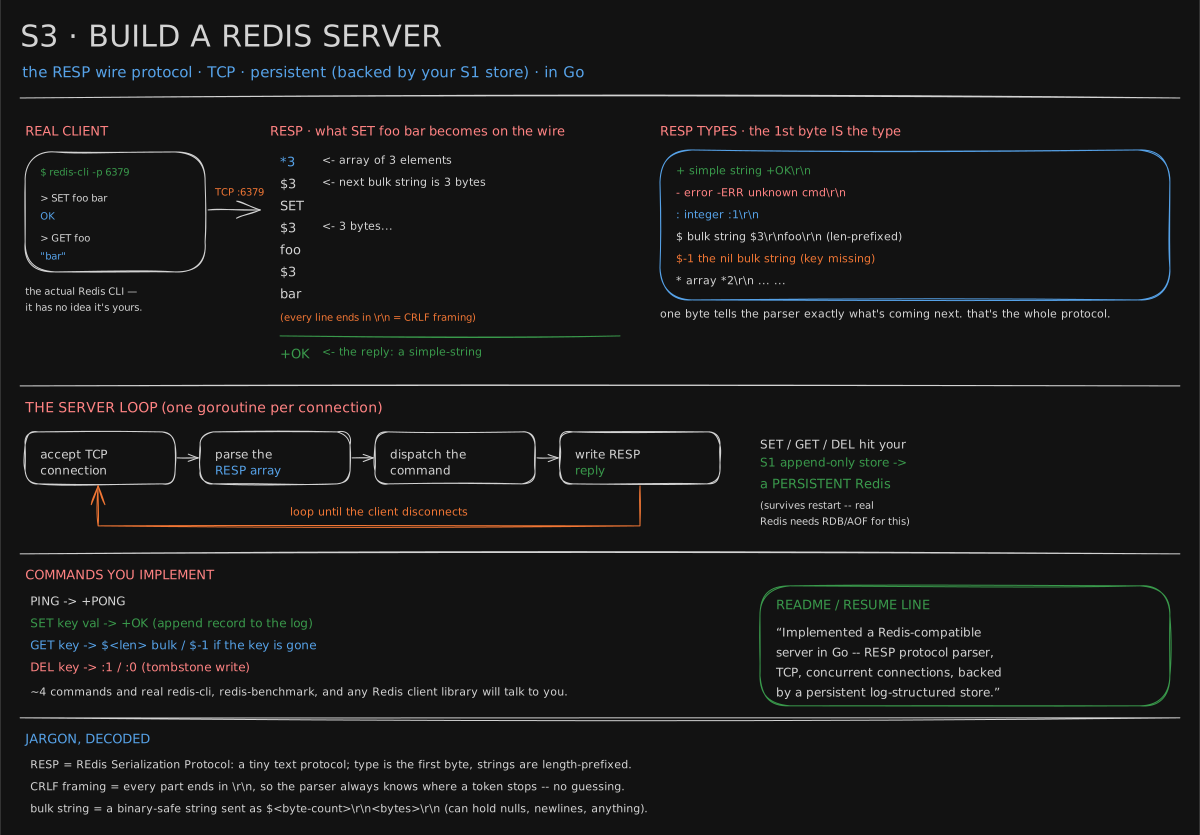
RESP in one screen
Every message’s first byte is its type:
| byte | type | example |
|---|---|---|
+ | simple string | +OK\r\n |
- | error | -ERR unknown command\r\n |
: | integer | :1\r\n |
$ | bulk string (length-prefixed) | $3\r\nfoo\r\n |
* | array | *2\r\n$3\r\nfoo\r\n$3\r\nbar\r\n |
A client command is always an array of bulk strings. \r\n is two invisible bytes (carriage return, newline) that end every token; the spaces below are only for reading. So SET foo bar arrives as:
*3\r\n $3\r\nSET\r\n $3\r\nfoo\r\n $3\r\nbar\r\nParsing is then short: read *N, then loop N times reading $len + that many bytes. The \r\n after every token (CRLF framing) means the parser never has to guess where a token ends.
The commands (start with four)
| command | reply | notes |
|---|---|---|
PING | +PONG | the “are you alive” handshake |
SET k v | +OK | db.Put → appends a record to the log |
GET k | $<len>... or $-1 | $-1 is the nil bulk string = key missing |
DEL k | :1 / :0 | db.Delete → tombstone |
Redis calls its own log the AOF; the appendfsync dial you’ll measure later controls how often it hits disk.
The architecture, drawn
The board’s x-ray, as boxes. Read it top to bottom for a live command, and bottom-up for a restart:
flowchart TD
  CLI[redis-cli or any client] -->|"bytes over TCP :6379"| L[listener]
  L -->|"one goroutine per connection"| P[RESP parser]
  P -->|"[SET, foo, bar]"| D{dispatch}
  D -->|"SET / DEL"| M[(map in memory)]
  D -->|"GET"| M
  M -->|"every write appended, then fsync"| F[append-only log on disk]
  F -.->|"replay on startup"| M
  D -->|"+OK  $3 bar  :1  $-1"| P
  P -->|"reply bytes"| CLI
Every write touches both the map and the file before +OK goes back; the dotted arrow is the only path that ever reads the file.
One SET, one GET, and a restart, byte by byte
The exact bytes, in the order they cross the socket - redis-cli here, but anything that writes RESP looks identical to the server. Each column is one participant, each arrow a message, time runs downward:
sequenceDiagram
  participant C as redis-cli
  participant S as your server
  participant M as map
  participant F as log file
  C->>S: *3 $3 SET $3 foo $3 bar
  S->>M: put foo=bar
  S->>F: append SET foo bar, fsync
  F-->>S: written
  S-->>C: +OK
  C->>S: *2 $3 GET $3 foo
  S->>M: get foo
  M-->>S: bar
  S-->>C: $3 bar
  Note over S,M: server killed, map is gone
  Note over S,F: server restarted, replays log line by line
  F-->>M: SET foo bar
  C->>S: *2 $3 GET $3 foo
  S->>M: get foo
  M-->>S: bar
  S-->>C: $3 bar
Look at the two GETs: the same request, the same reply, and the second one was answered by a map that had never seen the SET - it learned it from the file. That is the whole of “persistence” in this project.
Here are the 31 bytes of SET foo bar as they leave the client (printf ... | xxd). Each row is an offset in hex, sixteen bytes as hex pairs, then those bytes as text with . for unprintable ones:
00000000: 2a33 0d0a 2433 0d0a 5345 540d 0a24 330d  *3..$3..SET..$3.
00000010: 0a66 6f6f 0d0a 2433 0d0a 6261 720d 0a    .foo..$3..bar..
Count them before trusting the 31: the array header *3\r\n is 4 bytes, and each bulk string $3\r\n + three letters + \r\n is 4 + 3 + 2 = 9, so 4 + 3 × 9 = 31. A SET with a 100-byte value is 4 + 9 + 9 + (6 + 100 + 2) = 130 bytes, since $100\r\n is 6: the protocol’s overhead is a fixed handful of bytes per token, never a percentage. 2a is *, 24 is $, 0d0a is \r\n.
The whole thing in 56 lines of node (run first, then build the Go one)
The same four parts in node, so you can see the shape before typing the Go: replay the log, parse RESP, dispatch four commands, append every write. It listens on :6380 so it will not collide with a real Redis:
// mini-redis.mjs  -  node mini-redis.mjs
import net from "node:net";
import fs from "node:fs";

const LOG = "./redis.log";
const store = new Map();

// Persistence: replay the log on startup, append every write after that
if (fs.existsSync(LOG)) {
  for (const line of fs.readFileSync(LOG, "utf8").split("\n").filter(Boolean)) {
    const [op, k, v] = JSON.parse(line);
    op === "SET" ? store.set(k, v) : store.delete(k);
  }
}
const log = fs.openSync(LOG, "a");
const persist = (rec) => { fs.writeSync(log, JSON.stringify(rec) + "\n"); fs.fsyncSync(log); };

// RESP parser: "*N\r\n" then N x ("$len\r\n" + len bytes + "\r\n"). Returns [args, bytesUsed] or null.
function parse(buf) {
  if (buf[0] !== 0x2a) return null;                         // '*'
  let pos = buf.indexOf("\r\n"); if (pos < 0) return null;
  const n = parseInt(buf.subarray(1, pos)); pos += 2;
  const args = [];
  for (let i = 0; i < n; i++) {
    const end = buf.indexOf("\r\n", pos); if (end < 0 || buf[pos] !== 0x24) return null;  // '$'
    const len = parseInt(buf.subarray(pos + 1, end));
    if (buf.length < end + 2 + len + 2) return null;        // not all bytes arrived yet
    args.push(buf.subarray(end + 2, end + 2 + len).toString());
    pos = end + 2 + len + 2;
  }
  return [args, pos];
}

const bulk = (s) => s == null ? "$-1\r\n" : `$${Buffer.byteLength(s)}\r\n${s}\r\n`;
function run([cmd, k, v]) {
  switch ((cmd || "").toUpperCase()) {
    case "PING": return "+PONG\r\n";
    case "SET":  store.set(k, v); persist(["SET", k, v]); return "+OK\r\n";
    case "GET":  return bulk(store.get(k) ?? null);
    case "DEL":  { const had = store.delete(k); if (had) persist(["DEL", k]); return `:${had ? 1 : 0}\r\n`; }
    default:     return `-ERR unknown command '${cmd}'\r\n`;
  }
}

net.createServer((sock) => {
  let buf = Buffer.alloc(0);
  sock.on("data", (chunk) => {
    buf = Buffer.concat([buf, chunk]);
    let parsed;
    while ((parsed = parse(buf))) {                         // a chunk may hold several commands
      const [args, used] = parsed;
      sock.write(run(args));
      buf = buf.subarray(used);
    }
  });
}).listen(6380, () => console.log("mini-redis listening on :6380, log at " + LOG));
No redis-cli here, so the client is ten lines of node that encode each argument list as a RESP array and print the raw bytes back. Seven commands in one session, then the server is killed, restarted, and asked again:
$ node mini-redis.mjs &
mini-redis listening on :6380, log at ./redis.log
$ node resp-client.mjs "PING" "SET foo bar" "GET foo" "GET nope" "DEL foo" "GET foo" "SET foo bar2"
"+PONG\r\n+OK\r\n$3\r\nbar\r\n$-1\r\n:1\r\n$-1\r\n+OK\r\n"

$ kill %1; cat redis.log
["SET","foo","bar"]
["DEL","foo"]
["SET","foo","bar2"]

$ node mini-redis.mjs &          # fresh process, empty map
$ node resp-client.mjs "GET foo"
"$4\r\nbar2\r\n"
Read the reply string against the RESP table: +PONG, +OK, $3 bar, $-1 (missing key), :1 (one key deleted), $-1 (now missing), +OK. The log holds three lines, one per write, and the replay on restart applies them in order - SET, DEL, SET - which is why the new process answers bar2, not bar. The GETs never touched the file; reads come from the map alone.
The client, printed. Here are those ten lines of node, plus comments, rebuilt: each argument becomes one RESP array, all of them go down one connection, and everything that comes back is printed as a JSON string so the \r\n stays visible.
// resp-client.mjs  -  node resp-client.mjs "SET foo bar" "GET foo" ...
// Each argument becomes one RESP array; all go down one connection, and every
// byte that comes back is printed as a JSON string so \r\n stays visible.
import net from "node:net";

const resp = process.argv.slice(2).map((cmd) => {
  const args = cmd.split(" ");
  return `*${args.length}\r\n` + args.map((a) => `$${Buffer.byteLength(a)}\r\n${a}\r\n`).join("");
}).join("");

let out = "";
const sock = net.connect(6380, "localhost", () => sock.end(resp)); // send, then half-close
sock.on("data", (d) => (out += d));
sock.on("close", () => console.log(JSON.stringify(out)));
Run against the 56-line sketch above on 2026-10-17 (node v26.10.0), it printed exactly the session shown: the same seven replies, the same three log lines, and "$4\r\nbar2\r\n" after the restart.
The Go version in teaching/code/s3-redis/ splits this into resp.go, store.go and server.go, and its tests assert both the protocol over a real socket and the restart:
$ go test -v ./...
=== RUN   TestServerRESP
--- PASS: TestServerRESP (0.02s)
=== RUN   TestPersistenceAcrossRestart
--- PASS: TestPersistenceAcrossRestart (0.02s)
PASS
ok  	redisserver	0.532s
The three stages, each a commit
The same ladder as S1 and S2: one test file per stage, added in order, each a green checkpoint to commit.
| stage | add this file | run | what it checks |
|---|---|---|---|
| 1 | stage1_test.go | go test -run Stage1 | a TCP server that reads one RESP array and answers PING with +PONG, in any case; an unknown command gets -ERR and the connection stays open |
| 2 | stage2_test.go | go test -run Stage2 | SET, GET, DEL against the store: $-1 for a missing key, :1 then :0 for a repeated DEL, an error for a SET with no value |
| 3 | stage3_test.go | go test -run Stage3 | SET, DEL, SET on one server, the server stopped, a new one on the same file answers GET foo with bar2 |
Stage 3 is where S1 comes in: until then, any map behind Open passes. stage1_test.go holds the helpers (start a server on a free port, send a command as redis-cli would), so it stays; server_test.go, the original test, goes in last. Against the reference code, 2026-10-17:
$ go test -v -run Stage ./...
--- PASS: TestStage1Ping (0.00s)
--- PASS: TestStage2SetGetDel (0.01s)
--- PASS: TestStage3SurvivesRestart (0.01s)
ok  	redisserver	0.460s
The cost of durability, measured
Here is the size of that trade on this machine (Apple silicon, local SSD): 2,000 appends of the same 22-byte record, three ways.
$ node fsync-cost.mjs
fsync after every SET         7496 ms       267 SET/s   3.748 ms per SET
fsync once per second-ish       20 ms    102168 SET/s   0.010 ms per SET
no fsync (page cache only)       9 ms    215936 SET/s   0.005 ms per SET
An fsync (the call that makes the operating system push the bytes all the way to the disk instead of holding them in memory) costs about 3.7 ms here, so a server that fsyncs on every SET tops out near 270 writes per second, no matter how fast the parser is (7,496 ms ÷ 2,000 = 3.75 ms each; 1,000 ÷ 3.75 = 267 a second). Fsync once per batch and the same file takes 100,000 writes per second - roughly 380 times more. That is the dial Redis exposes as appendfsync always versus everysec: always is the top row, everysec the middle one, and its price is that a crash can lose up to a second of acknowledged writes. Neither is wrong; not knowing which one you’re running is.
The script behind that table, which this page did not show before. Save it as fsync-cost.mjs and run it in any folder; it writes and then deletes cost.log.
// fsync-cost.mjs  -  node fsync-cost.mjs
// 2,000 appends of the same 22-byte record to a fresh file, three ways:
// fsync after every write, fsync at most once a second, never fsync.
import fs from "node:fs";

const N = 2000, rec = Buffer.from("SET foo bar1234567890\n"); // 22 bytes

function run(label, sync) {
  fs.rmSync("cost.log", { force: true });
  const fd = fs.openSync("cost.log", "a");
  let lastSync = performance.now();
  const start = performance.now();
  for (let i = 0; i < N; i++) {
    fs.writeSync(fd, rec);
    if (sync === "always") fs.fsyncSync(fd);
    if (sync === "everysec" && performance.now() - lastSync >= 1000) {
      fs.fsyncSync(fd);
      lastSync = performance.now();
    }
  }
  if (sync === "everysec") fs.fsyncSync(fd); // the last batch, before we say done
  const ms = performance.now() - start;
  fs.closeSync(fd);
  console.log(label.padEnd(30), `${ms.toFixed(0).padStart(5)} ms`,
    `${Math.round(N / (ms / 1000)).toString().padStart(9)} SET/s`, `${(ms / N).toFixed(3)} ms per SET`);
}

run("fsync after every SET", "always");
run("fsync once per second-ish", "everysec");
run("no fsync (page cache only)", "never");
fs.rmSync("cost.log");
$ node fsync-cost.mjs
fsync after every SET 7671 ms 261 SET/s 3.836 ms per SET
fsync once per second-ish 20 ms 99297 SET/s 0.010 ms per SET
no fsync (page cache only) 19 ms 103474 SET/s 0.010 ms per SETMeasured 2026-10-17 on an Apple M4 laptop, node v26.10.0, with other jobs running. The top row is steady: about 4 ms per fsync, close to the 3.7 ms above. The other two rows are 2,000 writes in a few milliseconds, too short to time well, and they moved by two to four times between two runs a minute apart (the second run printed 206,283 and 443,561 a second). The gap between the top row and the rest, a factor of a few hundred, is the finding; the exact lower numbers are noise. “Once per second-ish” here means at most one fsync a second plus one at the end, so in a 20 ms run it is a single fsync, which is why it looks like no fsync at all.
Run it
cd teaching/code/s3-redis
go test ./...                       # RESP over a real socket + persistence-across-restart

go run . -addr :6379 -data redis.log
# then, if you have redis-cli:
redis-cli -p 6379 SET foo bar       # OK
redis-cli -p 6379 GET foo           # "bar"
# kill the server, restart it, GET foo again -> still "bar"  (that's S1 doing its job)
Run it yourself: all 8 source files
- Install Go from
go.dev/dl. Check it withgo version. - Make the folder:
mkdir -p teaching/code/s3-redis. Save each of the 8 files below at the path shown above it, including any subfolders. - Inside that folder, run
go mod init lessononce. Go needs a module name to build. - Run the commands in the block above from the folder where you ran mkdir.
teaching/code/s3-redis/main.gopackage main
import (
"flag"
"log"
)
// Run: go run . -addr :6379 -data redis.log
// Then: redis-cli -p 6379 (SET foo bar; GET foo; DEL foo)
func main() {
addr := flag.String("addr", ":6379", "address to listen on")
data := flag.String("data", "redis.log", "path to the append-only data file")
flag.Parse()
db, err := Open(*data)
if err != nil {
log.Fatal(err)
}
defer db.Close()
log.Printf("redis server on %s, persisting to %s", *addr, *data)
log.Fatal((&Server{db: db}).ListenAndServe(*addr))
}teaching/code/s3-redis/resp.gopackage main
// RESP (REdis Serialization Protocol) — just enough to talk to real Redis
// clients. A client command is always an array of bulk strings; replies are
// simple strings, errors, integers, or bulk strings. Type = the first byte.
import (
"bufio"
"fmt"
"io"
"strconv"
"strings"
)
func readLine(r *bufio.Reader) (string, error) {
s, err := r.ReadString('\n')
if err != nil {
return "", err
}
return strings.TrimRight(s, "\r\n"), nil
}
// readCommand parses one client request: *N\r\n then N bulk strings.
func readCommand(r *bufio.Reader) ([]string, error) {
line, err := readLine(r)
if err != nil {
return nil, err
}
if len(line) == 0 || line[0] != '*' {
return nil, fmt.Errorf("expected array, got %q", line)
}
n, err := strconv.Atoi(line[1:])
if err != nil {
return nil, err
}
args := make([]string, n)
for i := 0; i < n; i++ {
l, err := readLine(r)
if err != nil {
return nil, err
}
if len(l) == 0 || l[0] != '$' {
return nil, fmt.Errorf("expected bulk string, got %q", l)
}
sz, err := strconv.Atoi(l[1:])
if err != nil {
return nil, err
}
buf := make([]byte, sz+2) // value + trailing CRLF
if _, err := io.ReadFull(r, buf); err != nil {
return nil, err
}
args[i] = string(buf[:sz])
}
return args, nil
}
func writeSimple(w io.Writer, s string) { fmt.Fprintf(w, "+%s\r\n", s) }
func writeError(w io.Writer, s string) { fmt.Fprintf(w, "-ERR %s\r\n", s) }
func writeInt(w io.Writer, n int) { fmt.Fprintf(w, ":%d\r\n", n) }
func writeBulk(w io.Writer, b []byte) { fmt.Fprintf(w, "$%d\r\n%s\r\n", len(b), b) }
func writeNil(w io.Writer) { io.WriteString(w, "$-1\r\n") }teaching/code/s3-redis/server.gopackage main
import (
"bufio"
"net"
"strings"
)
type Server struct{ db *DB }
// ListenAndServe accepts connections and hands each to its own goroutine —
// that's Redis's whole concurrency model at this scale.
func (s *Server) ListenAndServe(addr string) error {
ln, err := net.Listen("tcp", addr)
if err != nil {
return err
}
for {
conn, err := ln.Accept()
if err != nil {
return err
}
go s.handle(conn)
}
}
func (s *Server) handle(conn net.Conn) {
defer conn.Close()
r := bufio.NewReader(conn)
for {
args, err := readCommand(r)
if err != nil {
return // client disconnected or sent garbage
}
if len(args) == 0 {
continue
}
switch strings.ToUpper(args[0]) {
case "PING":
writeSimple(conn, "PONG")
case "SET":
if len(args) < 3 {
writeError(conn, "wrong number of arguments for 'set'")
continue
}
if err := s.db.Put(args[1], []byte(args[2])); err != nil {
writeError(conn, err.Error())
continue
}
writeSimple(conn, "OK")
case "GET":
if len(args) < 2 {
writeError(conn, "wrong number of arguments for 'get'")
continue
}
v, err := s.db.Get(args[1])
if err == ErrNotFound {
writeNil(conn)
continue
}
if err != nil {
writeError(conn, err.Error())
continue
}
writeBulk(conn, v)
case "DEL":
if len(args) < 2 {
writeError(conn, "wrong number of arguments for 'del'")
continue
}
// ponytail: get-then-delete isn't atomic; fine for a single key.
// Per-key locking if you ever need DEL's count to be exact under races.
_, existed := s.db.Get(args[1])
s.db.Delete(args[1])
if existed == nil {
writeInt(conn, 1)
} else {
writeInt(conn, 0)
}
case "COMMAND":
writeSimple(conn, "OK") // redis-cli probes COMMAND DOCS on connect
default:
writeError(conn, "unknown command '"+args[0]+"'")
}
}
}teaching/code/s3-redis/server_test.gopackage main
import (
"bufio"
"fmt"
"net"
"path/filepath"
"strings"
"testing"
)
// Drive the server over a real TCP socket speaking raw RESP, exactly like
// redis-cli would, and check every reply type.
func TestServerRESP(t *testing.T) {
db, err := Open(filepath.Join(t.TempDir(), "data.log"))
if err != nil {
t.Fatal(err)
}
srv := &Server{db: db}
ln, err := net.Listen("tcp", "127.0.0.1:0")
if err != nil {
t.Fatal(err)
}
defer ln.Close()
go func() {
for {
c, err := ln.Accept()
if err != nil {
return
}
go srv.handle(c)
}
}()
conn, err := net.Dial("tcp", ln.Addr().String())
if err != nil {
t.Fatal(err)
}
defer conn.Close()
r := bufio.NewReader(conn)
send := func(parts ...string) {
fmt.Fprintf(conn, "*%d\r\n", len(parts))
for _, p := range parts {
fmt.Fprintf(conn, "$%d\r\n%s\r\n", len(p), p)
}
}
line := func() string {
s, _ := r.ReadString('\n')
return strings.TrimRight(s, "\r\n")
}
want := func(cmd, got, exp string) {
if got != exp {
t.Helper()
t.Fatalf("%s -> %q, want %q", cmd, got, exp)
}
}
send("PING")
want("PING", line(), "+PONG")
send("SET", "foo", "bar")
want("SET", line(), "+OK")
send("GET", "foo")
want("GET len", line(), "$3")
want("GET val", line(), "bar")
send("DEL", "foo")
want("DEL", line(), ":1")
send("GET", "foo")
want("GET missing", line(), "$-1")
}
// The whole point of backing it with S1: data survives a restart.
func TestPersistenceAcrossRestart(t *testing.T) {
p := filepath.Join(t.TempDir(), "data.log")
db, err := Open(p)
if err != nil {
t.Fatal(err)
}
db.Put("k", []byte("v"))
db.Close()
db2, err := Open(p)
if err != nil {
t.Fatal(err)
}
defer db2.Close()
if got, err := db2.Get("k"); err != nil || string(got) != "v" {
t.Fatalf("after restart k = %q, %v; want v", got, err)
}
}teaching/code/s3-redis/stage1_test.gopackage main
import (
"bufio"
"fmt"
"net"
"path/filepath"
"strings"
"testing"
)
// The stage tests. Each file checks one stage: save stage1_test.go, make it
// pass, commit; then add the next. `go test -run Stage2` runs one stage. The
// helpers below are used by every stage, so this file stays.
// Stage 1: a TCP server that reads one RESP array and answers PING. Anything
// it does not know gets a RESP error, and the connection stays open.
func TestStage1Ping(t *testing.T) {
addr, _ := serve(t, filepath.Join(t.TempDir(), "data.log"))
c := dial(t, addr)
c.expect(t, "+PONG", "PING")
c.expect(t, "-ERR unknown command 'NOPE'", "NOPE")
c.expect(t, "+PONG", "ping") // commands are case-insensitive
}
// serve starts a server on a free port over the log at path. It returns the
// address and a stop func that closes the listener and the store; the test's
// cleanup calls it too, and a second call is harmless.
func serve(t *testing.T, path string) (string, func()) {
t.Helper()
db, err := Open(path)
if err != nil {
t.Fatal(err)
}
ln, err := net.Listen("tcp", "127.0.0.1:0")
if err != nil {
t.Fatal(err)
}
stop := func() { ln.Close(); db.Close() }
t.Cleanup(stop)
srv := &Server{db: db}
go func() {
for {
c, err := ln.Accept()
if err != nil {
return
}
go srv.handle(c)
}
}()
return ln.Addr().String(), stop
}
type client struct {
conn net.Conn
r *bufio.Reader
}
func dial(t *testing.T, addr string) *client {
t.Helper()
conn, err := net.Dial("tcp", addr)
if err != nil {
t.Fatal(err)
}
t.Cleanup(func() { conn.Close() })
return &client{conn, bufio.NewReader(conn)}
}
// expect sends one command as a RESP array of bulk strings, the way redis-cli
// does, and checks the reply lines (a bulk string is two: "$3" then "bar").
func (c *client) expect(t *testing.T, want string, args ...string) {
t.Helper()
fmt.Fprintf(c.conn, "*%d\r\n", len(args))
for _, a := range args {
fmt.Fprintf(c.conn, "$%d\r\n%s\r\n", len(a), a)
}
var got []string
for range strings.Split(want, "\n") {
s, err := c.r.ReadString('\n')
if err != nil {
t.Fatalf("%v: %v", args, err)
}
got = append(got, strings.TrimRight(s, "\r\n"))
}
if g := strings.Join(got, "\n"); g != want {
t.Fatalf("%v -> %q, want %q", args, g, want)
}
}teaching/code/s3-redis/stage2_test.gopackage main
import (
"path/filepath"
"testing"
)
// Stage 2: SET, GET, DEL against the store. A missing key is the nil bulk
// string $-1, and DEL answers how many keys it removed: 1, then 0.
func TestStage2SetGetDel(t *testing.T) {
addr, _ := serve(t, filepath.Join(t.TempDir(), "data.log"))
c := dial(t, addr)
c.expect(t, "+OK", "SET", "foo", "bar")
c.expect(t, "$3\nbar", "GET", "foo")
c.expect(t, "$-1", "GET", "nope")
c.expect(t, ":1", "DEL", "foo")
c.expect(t, ":0", "DEL", "foo")
c.expect(t, "$-1", "GET", "foo")
c.expect(t, "-ERR wrong number of arguments for 'set'", "SET", "foo")
}teaching/code/s3-redis/stage3_test.gopackage main
import (
"path/filepath"
"testing"
)
// Stage 3: the log. Every write goes through S1's store, so a fresh server
// on the same file answers from replay alone. SET, DEL, SET must replay in
// that order: the new process says bar2, not bar and not nil.
func TestStage3SurvivesRestart(t *testing.T) {
path := filepath.Join(t.TempDir(), "data.log")
addr, stop := serve(t, path)
first := dial(t, addr)
first.expect(t, "+OK", "SET", "foo", "bar")
first.expect(t, ":1", "DEL", "foo")
first.expect(t, "+OK", "SET", "foo", "bar2")
stop() // the server is gone, and its map with it
addr, _ = serve(t, path) // a restart: a new map, rebuilt from the file
second := dial(t, addr)
second.expect(t, "$4\nbar2", "GET", "foo")
}teaching/code/s3-redis/store.gopackage main
// store.go is the S1 storage engine (append-only, log-structured, crash-safe)
// as the persistence layer for this Redis server. It is imported, not copied:
// go.mod's replace directive points the module path kvstore at the S1 folder
// beside this one, so a fix to S1 (like its torn-tail truncate) lands here
// too. See lesson 0146 for how it works - here it's just "a durable
// map[string][]byte".
import kv "kvstore"
type DB = kv.DB
var ErrNotFound = kv.ErrNotFound
func Open(path string) (*DB, error) { return kv.Open(path) }With a real redis-cli, verified. On 2026-10-17 the server above was driven by redis-cli 8.10.2, built from the official source tarball (https://download.redis.io/redis-stable.tar.gz, make redis-cli), on the default port, then killed and restarted:
$ go build -o redisserver . && ./redisserver -addr :6379 -data redis.log
2026/10/17 17:06:05 redis server on :6379, persisting to redis.log

$ redis-cli PING
PONG
$ redis-cli SET foo bar
OK
$ redis-cli GET foo
"bar"
$ redis-cli GET nope
(nil)
$ redis-cli DEL foo
(integer) 1
$ redis-cli SET foo bar2
OK
# server killed (SIGTERM) and started again on the same redis.log
$ redis-cli GET foo
"bar2"
(nil) is how redis-cli shows the $-1 from the table above, and (integer) 1 is :1. Anything outside the four commands gets the server’s error: redis-cli INCR n printed ERR unknown command 'INCR'. A real client cannot tell this server from Redis for the four commands it speaks, which is the claim the README gets to make.
Try it
- Save the node sketch as
mini-redis.mjs, run it, and talk to it with nothing butprintfandnc:printf '*3\r\n$3\r\nSET\r\n$3\r\nfoo\r\n$3\r\nbar\r\n*2\r\n$3\r\nGET\r\n$3\r\nfoo\r\n' | nc localhost 6380. Two commands in one chunk; you get+OKand$3 barback on one line. cat redis.log, kill the server, restart it,GET fooagain. Deleteredis.logand restart:$-1. The file IS the memory.- Comment out
fs.fsyncSync(log)inpersistand rerun the SET benchmark (fsync-cost.mjsabove, or 1,000SETs over the socket). Watch the ceiling lift, and say out loud what you gave up. cd teaching/code/s3-redis && go test -v ./...-TestPersistenceAcrossRestartis the second step, asserted.
Put it on GitHub (this is the pinnable one)
- Repo:
goredisorredis-from-scratch. Pin it - “I implemented Redis’s wire protocol” is a standout line. - README hero: a terminal recording of real
redis-clidriving your server, then a restart showing data survived. - Link the RESP spec and note which commands you support.
- Resume line: “Implemented a Redis-compatible server in Go - RESP protocol parser, concurrent TCP connections, backed by a persistent log-structured store (reused from my key-value DB project).”
Ship it. The same four files as S1’s “Ship it”, with goredis in place of gokv, and one change the import forces. On GitHub there is no ../s1-kvstore: a workflow checks out one repository. So this one checks out both, side by side, in the same layout as ~/portfolio. It needs your S1 repo to be public; YOU/gokv is that repo.
name: test
on: [push, pull_request]
jobs:
  test:
    runs-on: ubuntu-latest
    steps:
      - uses: actions/checkout@v7
        with:
          path: s3-redis
      - uses: actions/checkout@v7
        with:
          repository: YOU/gokv
          path: s1-kvstore
      - uses: actions/setup-go@v7
        with:
          go-version-file: s3-redis/go.mod
      - run: go vet ./... && go test -race ./...
        working-directory: s3-redis
repository and path are actions/checkout’s own inputs for exactly this (“Checkout multiple repos (side by side)” in its README). This workflow has not been run on GitHub; the folder layout it builds is the one the go test transcript in Get the code passed in. The README’s “What I measured” table is the fsync-cost.mjs output on your machine, and its picture is the architecture flowchart above. The resume line is now true of the code, which is the point of the import: your go.mod shows the reuse to anyone who opens it.
Go deeper
- RESP protocol spec (short, official, the source of truth): https://redis.io/docs/latest/develop/reference/protocol-spec/
- “Build Your Own Redis” (book-length, through hashes, expiry and pub/sub): https://build-your-own.org/redis/
- Flagship upgrade path: add
EXPIRE/TTL, thenINCR, then hashes (HSET/HGET). Addredis-benchmarknumbers to the README. Then put your S2 load balancer in front of three of these → a distributed, persistent, load-balanced datastore, all yours.
There is no flagship page on this site; that list names upgrades, not lessons. EXPIRE and the AOF dial are built in Keys That Die (Expiry) and Surviving a Crash (Persistence). Three of these behind S2 is S6, which starts with the keys that composition loses.
Related
-
Build Your Own Redis - From Scratch - the overview of the same build, and the door into the eight-part series below.
-
Redis 01: The Socket That Answers, Redis 02: RESP, The Wire Protocol, Redis: The Map (SET / GET / DEL) - the socket, the parser and the four commands, one lesson each, at a slower pace.
-
Redis: One Thread, Many Clients - why real Redis runs one thread where this brief spawns a goroutine per connection.
-
Keys That Die (Expiry) and Eviction: Memory Is Full - the
EXPIREand eviction upgrades named above, built. -
Surviving a Crash (Persistence) - the AOF and
appendfsyncdial, the fsync table above taken seriously. -
S2 · Build a Load Balancer - the door to put in front of three of these.
-
S1 · Build Your Own Database (for real) - the store this server imports, by its module name, through the
replaceline ingo.mod. -
The drawer that says it saved - what the 3.7 ms fsync is doing, in How Computers Work, with a lab for the interval.
-
S6 · Build a Replicated Key-Value Store (Dynamo-style) - many of these servers, and how a ring decides which ones hold each key.
Retrieval practice
8 questions. Answer each one before you open it.
Why does a length prefix ($3\r\nfoo\r\n) make bulk strings “binary-safe” when a plain delimiter wouldn’t?
With a delimiter (say, “read until \r\n”), a value that contains \r\n or a null byte would be split in the wrong place. A length prefix says “read exactly N bytes, whatever they are” - so the value can hold any bytes at all, including newlines and nulls.
What does $-1\r\n mean and when do you send it?
The nil bulk string - “this key has no value.” You send it for GET on a missing (or deleted) key. It’s distinct from $0\r\n\r\n, which is a real, present, empty string.
Your server spawns one goroutine per connection, all sharing one store. What makes that safe?
The store guards its map and file with a sync.RWMutex: many GETs can read concurrently, writes are exclusive. Without that lock, two goroutines appending to the log at once would interleave bytes and corrupt records.
Why is parsing a RESP array easier than parsing, say, an HTTP request?
RESP is self-describing and length-prefixed: the array header tells you the exact element count, and each bulk header tells you the exact byte length. You never scan for boundaries or handle optional/variable structure - read a number, read that many bytes, repeat.
Real Redis is in-memory; yours persists every SET to disk. What did you trade, and how would you get real-Redis speed back?
You traded write throughput for durability (an fsync per SET). To get speed back: batch fsyncs (flush every N ms) or keep data in a map and persist asynchronously via an append-only file - which is exactly Redis’s AOF with appendfsync everysec.
The log holds SET foo bar, DEL foo, SET foo bar2. After a restart, what does GET foo return, and why does the order of the lines matter?
bar2. Replay applies the lines in order to an empty map: put, delete, put. Applied in any other order the map would end up with bar or nothing. An append-only log is a history, and a history only means one thing when read from the start.
A network chunk arrives holding one and a half commands. What does the parser do with the half?
Returns null for it and leaves the bytes in the buffer. The next chunk is concatenated onto the leftover and parsing starts again from the same *. Length prefixes make this safe: the parser can tell “not enough bytes yet” from “malformed” without guessing.
On this machine an fsync costs about 3.7 ms. What is the ceiling on SETs per second with appendfsync always, and what does everysec buy?
About 1 / 0.0037 s = 270 per second, whatever the parser does. Fsyncing once per batch measured 102,000 per second, so everysec buys roughly 380 times the write throughput, at the price of up to one second of acknowledged writes lost in a crash.