Pages & Heap Files
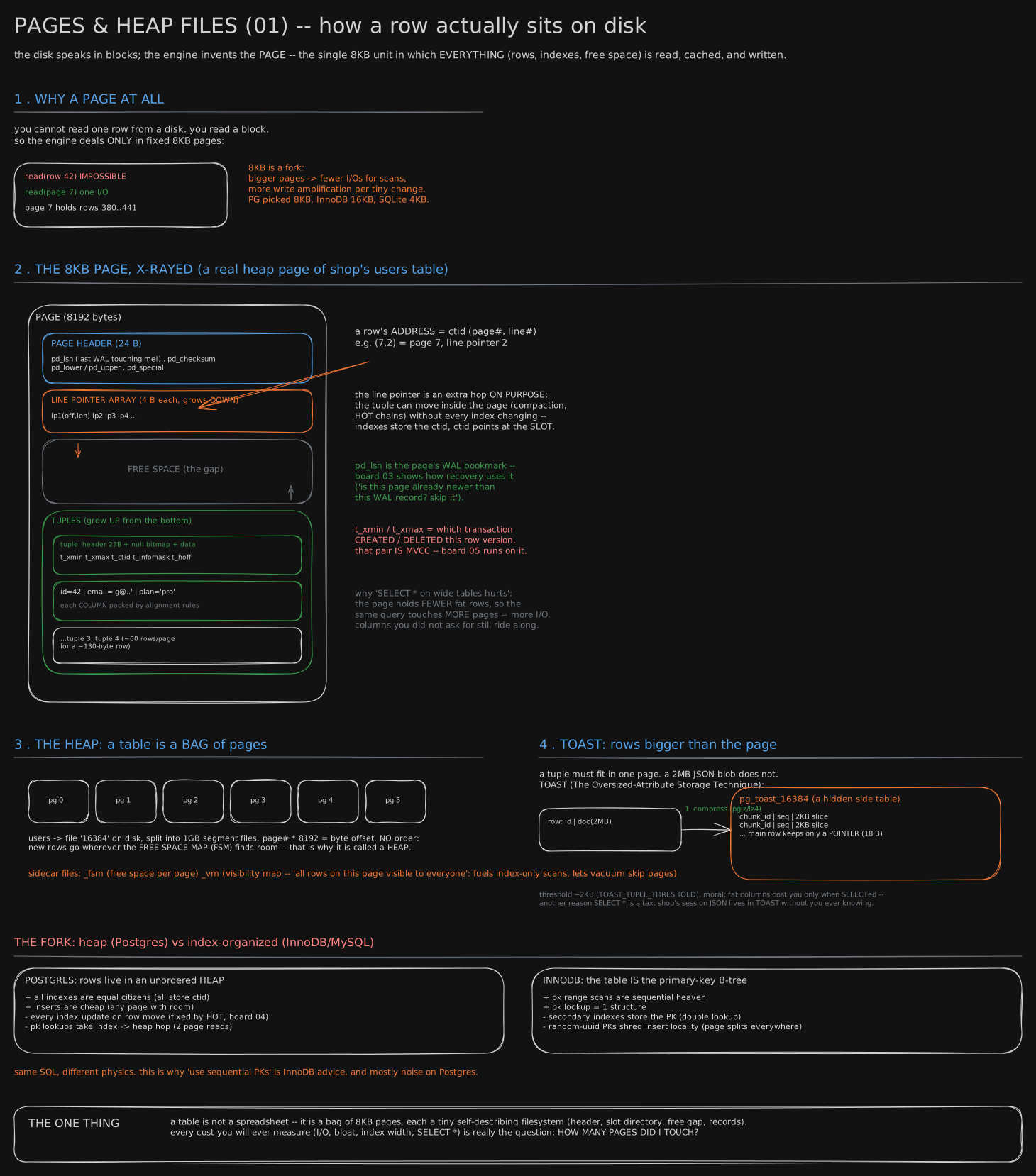
Opens the Database Internals series, under Database Internals - the deep-dive set and following Storage Engines. It draws the page you’re about to take apart.
Before you start. You’ve used an app that saves things - a login, a cart, a comment - and somewhere behind it sat a database. This lesson opens that box for the first time: what a table actually is on disk, before any of the machinery later lessons build on top of it.
1979: a database that had to fit in 128 kilobytes
In 1979, three programmers in Santa Clara - Larry Ellison, Bob Miner and Ed Oates - shipped the first version of a product nobody had sold before: a database you could ask questions of in something close to English, in a language called SQL. Their company had just renamed itself Relational Software, Inc., and their product was Oracle Version 2 (there was no version 1). They wrote it by hand in assembly language, the most literal instructions a chip understands, so it would run in 128 kilobytes of memory (a kilobyte is about a thousand typed characters) on a machine called the PDP-11.
Every database since, including the one behind whatever app you last opened, still answers the question that memory limit forced on Ellison’s team: when a program asks to save or fetch one row, what does the machine actually do?
The warehouse that will not hand you one can
Picture a warehouse that stores everything in bins of exactly the same size. You can’t ask a worker to bring you one can of soup out of a bin; the forklift only ever moves whole bins. Want one can? You get handed the whole bin, and you pick your can out of it yourself.
A computer’s disk works the same way: it only moves data in fixed-size chunks, and so does everything above it - the operating system, and the fast memory (RAM, the chip that forgets everything the moment the power drops, which is why the disk exists at all) that keeps recently used chunks close by. One row of a table is maybe 130 bytes: a name, an email, a date. Nothing underneath a database will hand it a single row. Below, the left side is what a program asks for and the right is what it gets; one I/O means one trip to the disk:
read(row 42)      IMPOSSIBLE - no layer beneath you offers this
read(page 7)      one I/O
                  page 7 happens to hold rows 380..441
Ask for a row, and what actually arrives is a whole fixed-size slice of the file, with your row buried somewhere inside it.
Databases stopped fighting that and gave the slice a name: a page. Postgres’s page is 8 kilobytes - 8,192 bytes - fixed when Postgres itself is built, not a setting you flip later. A page doesn’t hold one row; a 130-byte row leaves room for about 60 of them on one page (the arithmetic is in the second read). You never read a row; you read a page and pick your row out, like the can from the bin.
Different databases picked different bin sizes: Postgres 8KB, InnoDB (MySQL’s storage engine) 16KB, SQLite 4KB by default. A bigger bin means fewer forklift trips to read a whole warehouse, but restocking one can still drags the whole bin along.
Opening one bin: a label, an empty gap, then cans packed from the back
Pull one page open and it has a shape: a label, then a table of contents, then whatever room is left over.
At the top of every page sits a small header, and just under it a growing list of slots - one line per row, saying where on this page that row actually sits, the way one line on a bin’s inventory card says where inside the bin a particular can sits. The rows themselves get packed in from the far end of the page; the slot lines get added from the near end. The two grow toward each other across a gap of empty space in the middle, and the page is full the moment they meet - no walking the shelf looking for gaps, just checking whether the label side has bumped into the row side yet.
flowchart TD
    H[Page header, 24 bytes] --> S[Slot directory, grows down]
    S --> F[Free space, the gap]
    F --> T[Tuples, grow up from the bottom]
The four regions in the order they sit in the page, top to bottom; the gap in the middle is what an insert consumes.
On disk, a row’s own name for itself is a tuple - every database book calls it that, and it just means “one stored row, as bytes on a page.”
The tag that survives the shelf being rearranged
Here is the one hop that makes all of this work. A row’s address is never “byte 4,013 of the file.” It’s a pair: which page, and which line on that page’s inventory card - page 7, slot 2, which Postgres calls a ctid.
Why bother with the extra hop instead of pointing straight at the bytes? Because a worker is allowed to shuffle cans inside a bin - squeeze out gaps, repack it tighter - without telling anyone outside that bin. The inventory card gets rewritten to match, but the tag on the can, “bin 7, line 2,” never has to change, and every list in the warehouse that mentions that tag is still correct. Point straight at a shelf position instead, and repacking one bin means rewriting every list in the building that pointed into it.
The heap: a warehouse floor with no aisles
Now zoom out from one bin to the whole floor. A table is a file made of pages, one after another, and Postgres calls that file a heap. Heap is the right word: there’s no sorted order to the pages, and no promise that page 1 was written before page 2. A new row lands on whichever page currently has room, the way a worker drops a new pallet in the nearest open floor slot.
That sounds sloppy, and it’s a deliberate trade. To find one row fast, a database keeps an index: a separate sorted list saying which page holds which key, like the warehouse’s catalogue. The key is usually the primary key, the one column, such as an id, that names each row uniquely. InnoDB makes the opposite trade: it keeps the rows themselves sorted by primary key, so a key lookup finds the row in one structure - but an insert, adding a row, must land in the right sorted spot, which can mean shoving other rows aside. Postgres’s heap makes an insert cheap, since any page with space will do. The price: a key lookup takes two stops, the index to learn the page, then the page. Same job, two bills, and neither one is a mistake.
Every row you ask for, every table you scan, every column that rides along unasked, turns into page reads: the one bill a database cannot avoid.
You now know
- A table on disk is not rows in a spreadsheet; it’s a file of fixed-size pages, and nothing beneath a database will hand it anything smaller than one whole page.
- A page has a small header, then a list of slots (one short line per row, giving where on the page it sits), then empty space, then the rows packed in from the far end; it is full when slots and rows meet.
- Postgres addresses a row by page number plus slot number, called a ctid, not by its exact byte position, so a row can move within its page without any reference to it elsewhere changing.
- A Postgres table is a heap: pages in no sorted order, a new row on any page with room. Adding rows is cheap; finding a row by its id takes two reads, an index (a sorted list of which page holds which id) and then the page.
- Nearly every cost you’ll measure in a database - a slow query, a swollen table, a query fetching every column when it needed two - comes down to one question: how many pages did it touch?
Stop here if you want. What follows is the same page, in the exact bytes Postgres uses, for when you want to see inside one for real.
Second read: the page in bytes, and what a scan actually costs
The disk moves blocks, the filesystem moves blocks, the OS’s page cache moves pages - this is The Memory Hierarchy (cache, locality, the memory wall) one level down: the cache line was the CPU’s minimum unit, the page is the disk’s. Here is the bin’s real label, byte for byte:
 byte 0  ┌──────────────────────────────────────────┐
         │ PAGE HEADER (24 B)                       │
         │  pd_lsn  pd_checksum                     │
         │  pd_lower  pd_upper  pd_special          │
         ├──────────────────────────────────────────┤
         │ LINE POINTER ARRAY (4 B each) - grows ↓  │
         │  lp1(off,len)  lp2  lp3  lp4 ...         │
         ├──────────────────────────────────────────┤
         │                                          │
         │           FREE SPACE (the gap)           │  pd_lower ↕ pd_upper
         │                                          │
         ├──────────────────────────────────────────┤
         │ TUPLES - grow ↑ from the bottom          │
         │  tuple 4, tuple 3, ...                   │
         │  tuple 1: hdr 23B + null bitmap + data   │
 byte    │           t_xmin t_xmax t_ctid           │
 8191    └──────────────────────────────────────────┘
pd_lower marks the end of the slot array, pd_upper marks the start of the tuple region, and the page is full exactly when they meet - one subtraction, no free-list to walk. Slots are fixed-width (4 bytes), so slot n sits at a known byte; tuples are variable-width and can only be found by following a slot to them, which is why the two regions grow from opposite ends instead of packing from one side.
The ~130-byte row and the million-row table below are teaching values picked to keep the arithmetic round, not a measured table, while the page layout, header sizes and cost defaults are Postgres’s own, from its docs linked under Go deeper. For a ~130-byte row that gives roughly 60 rows per 8KB page: 60 × (130 bytes of tuple + 4 bytes of slot) ≈ 8,040 bytes, inside the 8,168 left after the header.
Two tuple-header fields matter later: t_xmin / t_xmax record which transaction created and which deleted this row version - the on-page half of what Transactions calls a transaction, and what the “MVCC & Vacuum” board runs on. pd_lsn is the page’s write-ahead-log bookmark, the hinge of both The Buffer Pool and the “WAL & Recovery” board.
The heap, compared. Same trade as above, in one table:
| Postgres - heap | InnoDB - index-organized | |
|---|---|---|
| where rows live | unordered pile of pages | inside the primary-key B-tree |
| primary-key lookup | index → heap hop (2 reads) | one structure, one descent |
| secondary index | stores a ctid, like every other index | stores the PK → double lookup |
| insert | any page with room - cheap | must land in PK order → page splits |
| PK range scan | random-ish | sequential heaven |
| row moves within a page | free, thanks to the slot | already inside the tree |
This is why “always use sequential primary keys” is real advice for InnoDB - a random ID shreds insert locality - and mostly noise on Postgres, where an insert just asks for any page with room.
Finding “a page with room” cheaply is what two sidecar files are for. _fsm, the Free Space Map, is a compact tree of roughly how much free space each page has - deliberately approximate, since exact would mean updating it on every write. _vm, the Visibility Map, is one bit per page meaning “every row here is visible to every transaction”; that bit lets an index-only scan skip the heap hop entirely, and lets vacuum skip pages with nothing to clean.
What a sequential scan costs. A million rows at ~60 per page is about 16,700 pages ≈ 137 MB. Postgres prices a scan in cost units: each page read in order costs seq_page_cost (1.0 by default), and each row checked costs cpu_tuple_cost (0.01), both defaults from the Postgres docs’ Planner Cost Constants, and a cost unit is not a millisecond:
seq scan cost ≈ pages × seq_page_cost + rows × cpu_tuple_cost
              ≈ 16,700 × 1.0          + 1,000,000 × 0.01
              ≈ 16,700                + 10,000          = 26,700
random_page_cost defaults to 4.0 - the planner’s built-in belief that a random page costs four times a sequential one (calibrated for spinning disks; on SSDs it is often lowered). Two things fall out of “cost is pages”: SELECT * on a wide table is a tax, since fatter rows mean fewer per page and the same query touches more of them, even for columns nobody asked for. And a scan isn’t automatically the slow plan - 16,700 sequential pages beats 5,000 random index-then-heap hops (16,700 × 1.0 = 16,700 against 5,000 × 4.0 = 20,000, page cost against page cost, leaving the row cost aside), so the break-even here is around 4,200 random pages, roughly a quarter of the table.
TOAST: when a row won’t fit. A tuple must fit inside one page; a 2MB JSON document doesn’t. TOAST (The Oversized-Attribute Storage Technique) handles it: past roughly a 2KB threshold Postgres compresses the value, and if it’s still too big, slices it into chunks in a hidden side table, leaving only an 18-byte pointer in the main row. A row with a TOASTed blob is a small row on its page until a query actually asks for the blob.
Sideways: storing a table by column. Everything above stores a table the way the warehouse stores cans: each bin holds whole rows, every column of one row packed together. That layout is called row-oriented storage, and it is right for the job an app does all day, fetching or changing one customer’s whole row. It is wrong for a different job: “how many users live in each city?” That question needs one column out of five, and a row store has to read every page of the table to get it, carrying the name, email and sign-up time of every user past the CPU only to drop them.
A column store turns the warehouse sideways. Each column gets its own pages: all the cities together, all the emails together. The city question then reads only city pages. On the bench’s users table a whole row is roughly 80 bytes once the 24-byte tuple header, the 4-byte slot and the five columns are counted, and the city on its own averages under 7 bytes. Those widths are estimated from the seed script’s values, not measured with pg_relation_size, so trust the ratio, about ten to one, more than either number.
Storing one column together has a second payoff, which is where analytics engines get most of their speed: a column of one kind of value, often repeating, compresses far better than a row of mixed values. Two encodings, on the bench’s real city column (100,000 values, 9 cities plus NULL, computed by re-running the seed script’s md5 rule in Python on 2026-10-17):
as stored, text:        600,050 bytes of city names
                        (690,113 with Postgres's 1-byte length header on each)
dictionary encoding:    10 distinct values -> a 4-bit code each
                        100,000 x 4 bits = 50,000 bytes, plus a ~60-byte dictionary
                        about 12x smaller than the text
run-length encoding:    store (value, how many in a row)
  in id order:          89,992 runs - neighbouring users rarely share a city
  sorted by city:       10 runs - ten (code, count) pairs, a few dozen bytes
Dictionary encoding replaces each value with a small number pointing into a list of the distinct values. Run-length encoding stores a repeated value once with its count, which only pays when equal values sit next to each other: 89,992 runs in signup order against 10 once sorted. That is why column stores choose a sort order for each table and treat it as a design decision, and why the same column can be 50 KB or a few dozen bytes depending on how it is laid down.
The bill lands on the app’s job. Adding one user to a column store means writing into five separate places, one per column, and fetching one user’s whole row means reading five. Engines built for analytics accept that; Postgres, built for the app, does not, which is why users here is a heap of whole rows. A middle layout exists too: PAX (Ailamaki, DeWitt, Hill and Skounakis, VLDB 2001) keeps each page’s rows on one page, as a row store does, but groups the values inside the page by column, so a scan of one column touches less memory without changing which pages are read. The columnar file formats used in analytics today store a group of rows together and each column inside the group together, the same compromise one level up. Storage Extras: richer indexes, warehouse schemas, column tricks picks up the warehouse side: star schemas, materialised aggregates and why a data warehouse is nearly always a column store.
Try it
Your bench
This Try it and every later one in the track run on this one bench: a throwaway Postgres in Docker holding two tables, users and accounts, with the same rows on every machine. Start it:
docker run -d --name dbbench -e POSTGRES_PASSWORD=bench -p 5433:5432 postgres:16Then fill it. The script waits for Postgres to come up, then pipes its SQL into psql inside the container:
cd teaching/code/di-bench
python3 seed.py
Run it yourself: full source file
- Install Python 3. Check it with
python3 --version. - Make the folder:
mkdir -p teaching/code/di-bench. Save the file below at the path shown above it, including any subfolders. - Run the commands in the block above from the folder where you ran mkdir.
teaching/code/di-bench/seed.py"""Seed the Database Internals bench: one Postgres every Try it in the track runs on.
Creates two tables, dropping them first, so running it again resets them:
users 100,000 rows id (primary key), name, email, city, signed_up_at
city is NULL for about one user in ten.
accounts 106,667 rows id (primary key), user_id, kind, balance, opened_at
users whose id is a multiple of 5 have no account; the rest have
one, and those whose id is also a multiple of 3 have two.
kind is 'checking', 'savings' or 'credit'.
Every value is derived from the row number (md5 of it, and modulo), never
random(), so every reader's bench holds the same rows. The only indexes are
the two primary keys, users_pkey and accounts_pkey, plus nothing on
accounts.user_id on purpose: a missing index has to show up somewhere.
Run it against a postgres:16 container (the name defaults to dbbench):
docker run -d --name dbbench -e POSTGRES_PASSWORD=bench -p 5433:5432 postgres:16
python3 seed.py # or: python3 seed.py <container-name>
Python 3 standard library only. It pipes SQL into psql inside the container
with `docker exec -i <container> psql -U postgres`.
"""
import subprocess
import sys
import time
CONTAINER = sys.argv[1] if len(sys.argv) > 1 else "dbbench"
USERS = 100_000
# h(x) is a 32-bit number read off md5(x): the same on every machine, every run.
SEED_SQL = f"""
DROP TABLE IF EXISTS accounts;
DROP TABLE IF EXISTS users;
CREATE TABLE users (
id int NOT NULL,
name text NOT NULL,
email text NOT NULL,
city text,
signed_up_at timestamptz NOT NULL
);
INSERT INTO users (id, name, email, city, signed_up_at)
SELECT g,
n.first || '_' || g,
n.first || '_' || g || '@example.com',
(ARRAY['Pune', 'Delhi', 'Mumbai', 'Bengaluru', 'Chennai',
'Kolkata', 'Jaipur', 'Hyderabad', 'Lucknow', NULL])[1 + h.v % 10],
timestamptz '2024-01-01 00:00:00+00'
+ (h.v % 1000) * interval '1 day'
+ (g % 1440) * interval '1 minute'
FROM generate_series(1, {USERS}) AS g
CROSS JOIN LATERAL (
SELECT ('x' || substr(md5(g::text), 1, 8))::bit(32)::bigint AS v
) AS h
CROSS JOIN LATERAL (
SELECT (ARRAY['alice', 'bob', 'carol', 'dev', 'esha',
'farid', 'gita', 'hari'])[1 + g % 8] AS first
) AS n
ORDER BY g;
ALTER TABLE users ADD CONSTRAINT users_pkey PRIMARY KEY (id);
CREATE TABLE accounts (
id int NOT NULL,
user_id int NOT NULL,
kind text NOT NULL,
balance int NOT NULL,
opened_at timestamptz NOT NULL
);
INSERT INTO accounts (id, user_id, kind, balance, opened_at)
SELECT row_number() OVER (ORDER BY u.id, k),
u.id,
(ARRAY['checking', 'savings', 'credit'])[1 + h.v % 3],
(h.v % 50000)::int,
u.signed_up_at + (h.v % 90) * interval '1 day'
FROM users AS u
CROSS JOIN LATERAL generate_series(
1,
CASE WHEN u.id % 5 = 0 THEN 0 -- no account at all
WHEN u.id % 3 = 0 THEN 2 -- two accounts
ELSE 1 END
) AS k
CROSS JOIN LATERAL (
SELECT ('x' || substr(md5('acct' || u.id || '-' || k), 1, 8))::bit(32)::bigint AS v
) AS h
ORDER BY u.id, k;
ALTER TABLE accounts ADD CONSTRAINT accounts_pkey PRIMARY KEY (id);
ALTER TABLE accounts ADD CONSTRAINT accounts_user_id_fkey
FOREIGN KEY (user_id) REFERENCES users (id);
VACUUM ANALYZE users;
VACUUM ANALYZE accounts;
"""
SUMMARY_SQL = """
SELECT label, n FROM (
SELECT 1 AS ord, 'users' AS label, count(*) AS n FROM users
UNION ALL SELECT 2, 'accounts', count(*) FROM accounts
UNION ALL SELECT 3, 'users with no account', count(*) FROM users u
WHERE NOT EXISTS (SELECT 1 FROM accounts a WHERE a.user_id = u.id)
UNION ALL SELECT 4, 'users with city NULL', count(*) FROM users WHERE city IS NULL
UNION ALL SELECT 5, 'accounts, kind = ' || kind, count(*) FROM accounts GROUP BY kind
) s ORDER BY ord, label;
"""
def psql(sql, *flags):
return subprocess.run(
["docker", "exec", "-i", CONTAINER,
"psql", "-U", "postgres", "-X", "-v", "ON_ERROR_STOP=1", *flags],
input=sql, text=True, capture_output=True,
)
def wait_for_postgres():
# The image starts a temporary server to initialise, then restarts. The
# temporary one does not listen on TCP, so asking over 127.0.0.1 waits
# for the real one.
for _ in range(60):
r = subprocess.run(
["docker", "exec", CONTAINER, "pg_isready", "-h", "127.0.0.1", "-U", "postgres"],
capture_output=True, text=True,
)
if r.returncode == 0:
return
time.sleep(1)
sys.exit(f"Postgres in container {CONTAINER!r} did not come up in 60s")
def main():
wait_for_postgres()
r = psql(SEED_SQL, "-q")
if r.returncode != 0:
sys.exit(r.stderr)
r = psql(SUMMARY_SQL, "-At", "-F", "\t")
if r.returncode != 0:
sys.exit(r.stderr)
print("bench seeded:")
for line in r.stdout.splitlines():
label, count = line.split("\t")
print(f" {label:<26} {int(count):>7,}")
if __name__ == "__main__":
main()What it printed (measured 2026-09-28, on a fresh container):
bench seeded:
  users                      100,000
  accounts                   106,667
  users with no account       20,000
  users with city NULL         9,937
  accounts, kind = checking   35,544
  accounts, kind = credit     35,261
  accounts, kind = savings    35,862
users has id, name, email, city and signed_up_at; accounts has id, user_id, kind, balance and opened_at. The only indexes are the two primary keys, users_pkey and accounts_pkey; accounts.user_id points at users.id and has no index, on purpose. Every value comes from the row number, never from random(), which is why your counts match the ones above. Open a psql prompt on it with:
docker exec -it dbbench psql -U postgresThe -p 5433:5432 is only for a desktop client you might point at it; every command in the track goes through docker exec. Running python3 seed.py again drops both tables and rebuilds them, so re-run it after a Try it that changes them. To throw the whole bench away and start clean:
docker rm -f dbbenchOn any Postgres, look at a real page instead of taking my word for it:
CREATE EXTENSION pageinspect;

-- the slot array and tuple headers of page 0
SELECT lp, lp_off, lp_len, t_xmin, t_xmax, t_ctid
FROM heap_page_items(get_raw_page('users', 0));

-- the header: watch lower and upper close on each other as you insert
SELECT lower, upper, special, pagesize FROM page_header(get_raw_page('users', 0));

-- how many pages is this table, really?
SELECT relpages, reltuples, pg_size_pretty(pg_relation_size('users'))
FROM pg_class WHERE relname = 'users';
Then delete half the rows and re-run the relpages query. It will not shrink - the pages are still there, full of dead tuples. That gap between “rows I have” and “pages I read” is bloat, the subject of the “MVCC & Vacuum” board and /labs/the-vacuum-lag/.
Go deeper
- Postgres docs - Database Page Layout (the struct-by-struct truth behind the x-ray above)
- Database File Layout, Free Space Map, Visibility Map and TOAST
- The Internals of PostgreSQL - Hironobu Suzuki, ch. 1 (free, and the clearest heap diagrams anywhere)
- CMU 15-445 Intro to Database Systems - Andy Pavlo (the database-storage lectures: pages, slotted pages, tuple layout)
- Database Internals - Alex Petrov, ch. 3 “File Formats” (slotted pages from first principles, engine-agnostic)
- Architecture of a Database System - Hellerstein, Stonebraker & Hamilton (section 4 for where storage sits in the whole machine).
More: Weaving Relations for Cache Performance - Ailamaki, DeWitt, Hill & Skounakis, VLDB 2001 (PAX: rows on a page, columns inside it).
Related
The Buffer Pool · WAL & Recovery · B-Tree on Disk · MVCC & Vacuum · Database Internals - the deep-dive set
The full Database Internals list is in CURRICULUM.
Retrieval practice
6 questions. Answer each one before you open it.
Why does a database deal in fixed-size pages instead of reading one row at a time?
Because nothing beneath it offers a single row. The disk, the filesystem, and the OS’s page cache all move fixed blocks - asking for 130 bytes still costs a whole block. So the database adopts a matching fixed unit and reads a page to get a row. Postgres’s page is 8KB, a compile-time constant; InnoDB uses 16KB, SQLite 4KB by default. Bigger pages mean fewer I/Os per scan but more write amplification, since changing one byte still rewrites the whole page.
Inside a page, why do the slots grow down from the top while the rows grow up from the bottom?
Because the two things have different shapes, and neither should have to reserve room for the other. Slots are fixed-width (4 bytes), so slot n is found by arithmetic; rows are variable-width and can only be found by following a slot to them. Growing from opposite ends lets them share one gap in the middle, and the header’s pd_lower/pd_upper mark where each side currently ends - the page is full exactly when those two meet, one subtraction rather than a walk down a free list.
A row’s address is ctid (7,2). Why not just store a byte offset, and what does the extra hop buy?
(7,2) means page 7, slot 2 - a slot number, not a location; the slot holds the real offset inside the page. That indirection lets a row move inside its page (to repack it, or during cleanup) while every index keeps pointing at (7,2) and stays correct. A byte offset would mean rewriting every index entry that pointed at that row, every time it moved.
What makes a heap file a “heap,” and name one thing that gets cheaper and one that gets more expensive because of it.
A heap is an unordered pile of pages: nothing guarantees any sort order, and a new row goes wherever the Free Space Map finds room. Cheaper: inserts, which just need any page with space - why random IDs barely hurt on Postgres and wreck InnoDB. More expensive: primary-key lookups, which cost an index descent plus a heap-page read, since the index stores a ctid rather than the row itself.
What do the _fsm and _vm sidecar files do, and why does each exist?
_fsm is the Free Space Map: roughly how much free space each page has, so finding room for an insert costs a couple of reads instead of a table scan. It’s deliberately approximate - exact would mean updating it on every write. _vm is the Visibility Map: one bit per page meaning “every row here is visible to everyone,” which lets an index-only scan skip the heap hop, and lets vacuum skip pages with nothing to clean.
Estimate what a sequential scan of a 1M-row table costs, and say why SELECT * on a wide table is a tax.
At ~130-byte rows you fit roughly 60 per 8KB page, so 1M rows is about 16,700 pages ≈ 137 MB, all read in order. Postgres prices it as pages × seq_page_cost + rows × cpu_tuple_cost ≈ 16,700 + 10,000 ≈ 26,700 with default settings. SELECT * is a tax because the cost is pages: fatter rows mean fewer rows per page, so the same query touches more pages, and columns nobody asked for still ride along in the I/O.