Everything Is a Number (bits & bytes)
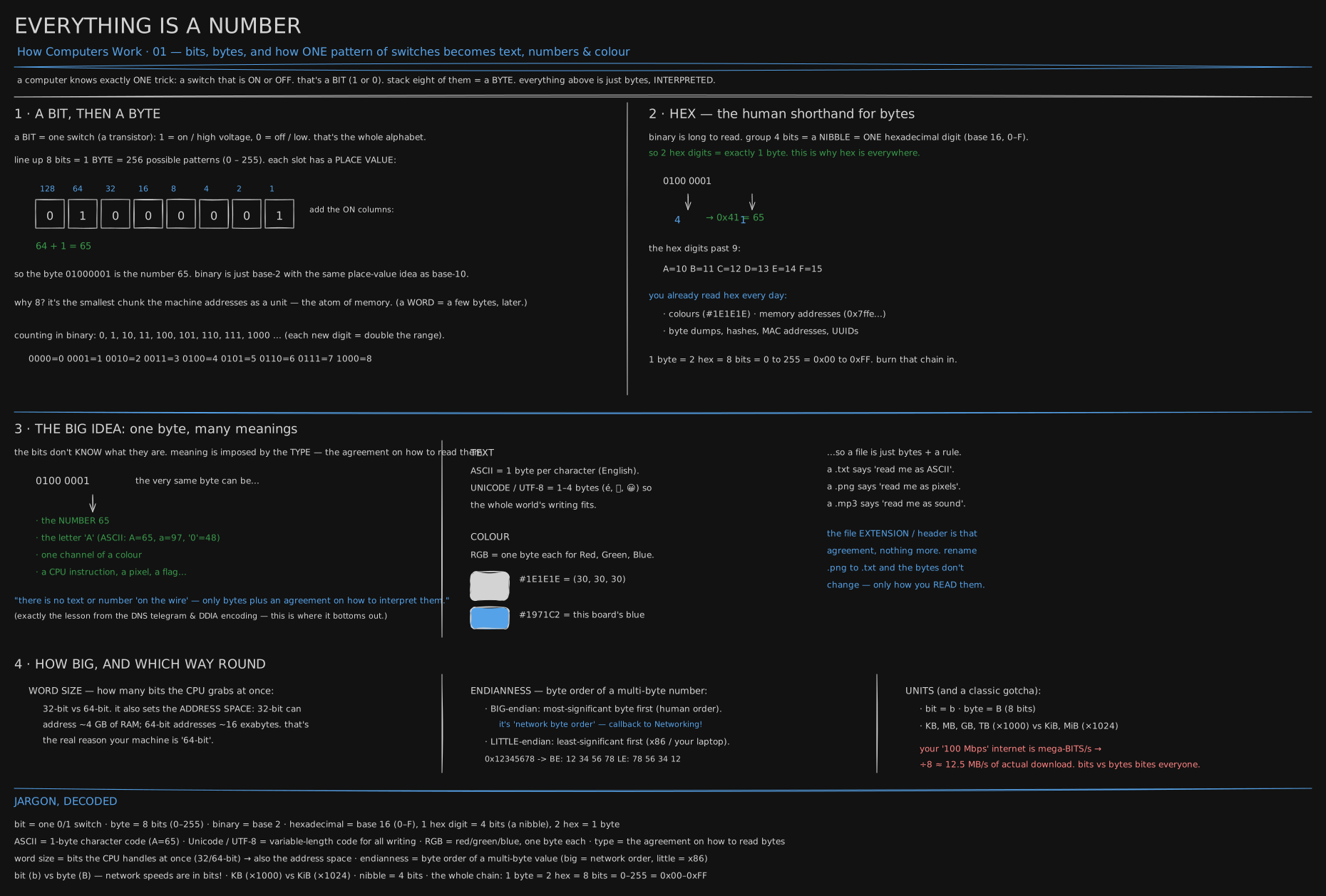
One row of switches, each one lit or dark, read four different ways: as a number, a letter, a color, an instruction. It opens the How Computers Work track and is the floor the rest of the series stands on.
Before you start. Nothing from earlier in this track - this is where it begins. All the arithmetic in the story half is counting to eight and doubling; everything past that is two engineers, two memos, and one switch.
9 January 1947: a memo shrinks a phrase
John Tukey was a mathematician splitting his week between Princeton and Bell Labs in 1947. Engineers there kept writing out “binary digit” - a single answer that is only ever yes or no, on or off, nothing between them. On 9 January 1947, in an internal memo, Tukey shortened the phrase. Binary digit became bit.
A bit is that single yes-or-no answer, nothing more. A light switch is one bit: up or down. A coin, once it lands, is one bit: heads or tails. A computer is built out of switches this simple, wired by the million, and every one of them is only ever on or off. That is the one physical trick the entire machine runs on.
1948: Shannon puts it in print, and a bit becomes a way to count
A year later another Bell Labs researcher put the word into print. Claude Shannon’s paper “A Mathematical Theory of Communication” ran in the Bell System Technical Journal in July 1948, used bit as its unit of information, and credited the word to Tukey.
Shannon’s real question was simple to ask: how many yes/no answers does it take to pin down one thing out of many? One bit picks one of two things. Two bits, lined up, pick one of four: off-off, off-on, on-off, on-on. Each extra bit doubles how many things the line can tell apart.
That doubling is exactly how a row of switches counts. Give each column a value double the one to its right. Decimal does the same with ten symbols a column; here there are only two:
0 1 0 0 0 0 0 1 = 64 + 1 = 65The two lit switches are worth 64 and 1; everything else is off. Sixty-four plus one is sixty-five. Line up eight switches this way and you have named 256 different values, because two doubled eight times is 256 - this particular row of eight will matter again in a moment.
1956: an IBM engineer needs a name for eight switches at once
Eight years later, at IBM, an engineer named Werner Buchholz was designing the Stretch computer and needed a name for the group of switches it would handle as one unit - enough to hold one letter of text. In June 1956 he called it a byte, a deliberate misspelling of “bite” so a typo could never turn it into “bit.”
Eight became the size that stuck. It’s the same eight-switch row from the last section, already 256 patterns, enough for every letter, digit and punctuation mark anyone needed, and it was the smallest group early machines could address as one unit - the atom of memory. IBM’s System/360, launched in 1964, built its whole product line on the eight-bit byte, and the industry followed.
Reading eight switches without going blind
Writing eight zeros and ones for every byte gets unreadable fast, so engineers grouped four switches at a time and gave each group one symbol: 0 through 9, then A through F for the six values a decimal digit can’t hold. Two of these symbols, side by side, name one byte exactly, since four switches plus four switches is eight. Engineers call this hex, short for hexadecimal - base sixteen instead of base ten.
0100 0001 → 4 1 → 0x41 = 65Read left to right: the first four switches are worth 4 in hex, the second four are worth 1, and 0x41 (the 0x only marks it as hex) is the same 65 you already added up in binary. You already read hex daily without knowing its name - a web color like #1E1E1E, a memory address, a device’s MAC address are all hex, two symbols per byte.
The byte that doesn’t know what it is
Here is the idea the whole track stands on. Take the byte from two sections ago: 01000001, or 0x41, or 65. Ask a program to read it as a whole number and it answers sixty-five. Ask a different program to read that same byte using the alphabet code called ASCII and it answers the letter A. Ask a third to read it as one channel of a paint mix and it answers with a shade of grey.
The switches never move. Nothing inside the byte says “I am a number” or “I am a letter.” The only thing that decides is the rule brought to it - which program is doing the reading, and what it was told to expect. That rule is called the byte’s type: the agreement about how to turn switches back into meaning.
You can watch one byte answer to three readings at once, in a few lines run on a real machine:
const b = Buffer.from([0x41]);
console.log("bits   ", b[0].toString(2).padStart(8, "0"));
console.log("number ", b.readUInt8(0));
console.log("letter ", b.toString("latin1"));
console.log("hex    ", "0x" + b.toString("hex"));
// place values, computed rather than recalled
const bits = "01000001".split("").map(Number);
const places = bits.map((bit, i) => bit * 2 ** (7 - i));
console.log("places ", places.join(" + "), "=", places.reduce((a, c) => a + c));
// text: the same character, bytes per character
for (const s of ["A", "é", "中", "😀"]) console.log(`${s}  ${Buffer.byteLength(s)} byte(s)  ${Buffer.from(s).toString("hex")}`);
bits 01000001
number 65
letter A
hex 0x41
places 0 + 64 + 0 + 0 + 0 + 0 + 0 + 1 = 65
A 1 byte(s) 41
é 2 byte(s) c3a9
中 3 byte(s) e4b8ad
😀 4 byte(s) f09f9880The first four lines are one byte and four readers: the switches, the number, the letter, and the hex shorthand. The “places” line is the place-value column from the Shannon section, done by the machine instead of by hand. The last four lines look ahead: the same code that gives you A in one byte needs two switches for an accented letter, three for a Chinese character, four for an emoji - because ASCII alone was built for English. More on why in the second read.
A file is bytes plus a rule
The same idea is why a file is anything at all. Here are the first sixteen bytes of two real files, dumped by xxd, a tool that prints raw bytes as hex on the left and attempts them as text on the right. JFIF is the tag a JPEG writes near its start:
$ xxd -l 16 poster.jpg
00000000: ffd8 ffe0 0010 4a46 4946 0001 0100 0001  ......JFIF......
$ xxd -l 16 favicon.svg
00000000: 3c73 7667 2078 6d6c 6e73 3d22 6874 7470  <svg xmlns="http
Same tool, same sixteen columns, two unrelated right-hand sides. The SVG’s first four bytes, 3c 73 76 67, are the characters <, s, v, g under the text rule - an SVG is a text file, so a text editor reads it correctly. The JPEG’s first two bytes, ff d8, are not a character at all; a JPEG decoder reads that exact pair as “a picture starts here,” and nothing else does.
flowchart LR
  B["bytes on disk: ff d8 ff e0 ..."] --> R{which rule?}
  R -->|text editor: read as characters| T["garbage: unprintable marks, then JFIF"]
  R -->|image viewer: read as JPEG| I["a picture"]
  R -->|node Buffer: read as integers| N["255, 216, 255, 224, ..."]
One set of bytes, one fork, three different readers, three different answers. The bytes on disk never move down any branch - only the rule changes, which is why renaming a file’s extension can turn a picture into garbage on screen without erasing a single switch inside it.
You now know
- A computer is switches wired by the million, and each switch, on or off, is one bit.
- Eight bits in a row make one byte, 256 possible patterns, because each extra bit doubles how many patterns there are.
- Hex is a shorthand for reading bytes: two hex digits always spell exactly one byte.
- A byte carries no meaning of its own. The same eight switches read as a number, a letter, or a color depending only on the rule applied to them, called its type.
- Renaming a file changes which rule a program uses to read its bytes. It changes nothing inside the file itself.
Stop here if you want. What follows is the same bytes in numbers: hex by hand, text encoding, and a byte-order bug.
Second read: the same bytes, in numbers
Hex to decimal by hand is one multiply per digit, sixteens instead of tens: 0x41 = 4 × 16 + 1 = 65, 0x1E = 1 × 16 + 14 = 30, 0xFF = 15 × 16 + 15 = 255.
One power-of-two fact turns any big binary count into a decimal one in your head: 2¹⁰ = 1,024 ≈ 10³ (a thousand), so 2²⁰ ≈ 10⁶ (a million) and 2³⁰ ≈ 10⁹ (a billion). Each ten-bit step loses 2.4%, so three steps lose about 7% - why “about” is honest here and “exactly” is not.
Back in the story, an accented letter cost two bytes and an emoji cost four. Here is the ladder that produces those numbers, one more marker bit at a time:
 1 byte    0xxxxxxx                              7 bits   →       128 characters   ASCII
 2 bytes   110xxxxx 10xxxxxx                    11 bits   →     2,048             Latin, Greek, Cyrillic, Hebrew, Arabic
 3 bytes   1110xxxx 10xxxxxx 10xxxxxx           16 bits   →    65,536             every living script, CJK included
 4 bytes   11110xxx 10xxxxxx 10xxxxxx 10xxxxxx  21 bits   → 2,097,152             emoji, historic scripts, and room
Each extra byte spends some bits announcing “more of me follows” and keeps the rest as payload. One byte free of markers holds 7 payload bits: 128 characters, what ASCII covers. Two bytes hold 11: 2,048, enough for Latin accents, Greek, Cyrillic, Hebrew and Arabic. Three hold 16: 65,536, every living script including CJK. Four hold 21: over two million, and Unicode defines only 1,114,112 characters total - so four bytes is always enough, and this scheme, UTF-8, never needed a fifth.
Two more agreements cover groups of bytes rather than one at a time. Word size is how many bits the CPU moves as a unit, 32 or 64 today, which also fixes how much memory an address can name: 2³² locations or 2⁶⁴. Endianness is the order the bytes of one multi-byte number are stored in - big-endian writes the most significant byte first, the order you’d say a number aloud; little-endian writes the least significant first. Big-endian is also “network byte order,” the order a number travels the internet in, whatever either machine prefers internally.
Ask this machine which order it uses, write one number both ways, then read the little-endian bytes back as if they were big-endian - exactly the bug that happens when code forgets to convert a number at the network’s edge:
import os from "node:os";
console.log("this cpu is", os.endianness());
const be = Buffer.alloc(4), le = Buffer.alloc(4);
be.writeUInt32BE(0x12345678); le.writeUInt32LE(0x12345678);
console.log("0x12345678 big-endian   ", be.toString("hex").match(/../g).join(" "));
console.log("0x12345678 little-endian", le.toString("hex").match(/../g).join(" "));
console.log("read LE bytes as BE     ", "0x" + le.readUInt32BE(0).toString(16));
console.log("100 Mbps =", 100e6 / 8 / 1e6, "MB/s");
console.log("a '1 TB' drive =", (1e12 / 2 ** 30).toFixed(1), "GiB as the OS reports it");
console.log("address space 32-bit =", (2 ** 32 / 2 ** 30), "GiB   64-bit =", (2 ** 64 / 2 ** 60).toFixed(0), "EiB");
this cpu is LE
0x12345678 big-endian 12 34 56 78
0x12345678 little-endian 78 56 34 12
read LE bytes as BE 0x78563412
100 Mbps = 12.5 MB/s
a '1 TB' drive = 931.3 GiB as the OS reports it
address space 32-bit = 4 GiB 64-bit = 16 EiBThis machine answers LE: little-endian won the desktop, on ARM just as on Intel, and big-endian survives only as the wire order because the earliest internet protocols were written on machines that used it. The third line is the bug in one number: 0x12345678 arrived as 78 56 34 12, got read in the wrong order, and became 0x78563412 - about 6.6 times too large, no error raised. htonl/ntohl exist purely to stop that line from ever running.
The last three lines are the units gotchas by hand. “100 megabit” moves 100,000,000 bits a second; ÷8 for bytes gives 12,500,000, the 12.5 MB/s ceiling an advertised speed never states. A “1 TB” drive holds 1,000,000,000,000 bytes exactly; the OS divides by 1,024 three times and reports 931 GiB, nothing missing. And the two address spaces above: 2³² bytes is exactly 4 GiB, why a 32-bit program can never use a ninth gigabyte of RAM; 2⁶⁴ bytes is 16 exbibytes, a ceiling no machine will reach, why address width stopped growing at 64.
Try it
b = 0x41
print(b, chr(b), bin(b), hex(b))          # 65 A 0b1000001 0x41
print("A".encode(), "é".encode(), "😀".encode())  # ASCII 1 byte vs UTF-8 multi-byte
import struct
print(struct.pack(">I", 0x12345678).hex())  # big-endian: 12345678
print(struct.pack("<I", 0x12345678).hex())  # little-endian: 78563412
Rename a .png to .txt, open it in a text editor, and watch garbage: same bytes, wrong rule.
Three more, each one command:
xxd -l 16 any-photo.jpg          # ff d8 ff e0 ... JFIF: a rule you can now read
xxd -l 16 any-icon.svg           # 3c 73 76 67 = <svg: text all the way down
node -e 'console.log(require("os").endianness(), Buffer.from("😀").toString("hex"))'
The first two are the decoding chain in reverse: bytes first, then guess the rule. The third prints LE f09f9880 on any recent laptop - your CPU’s byte order and the four bytes of one emoji, first byte f0 readable now as “three more bytes follow.”
Go deeper
- Code: The Hidden Language of Computer Hardware and Software - Petzold (a bottom-up build, and a delight)
- Two’s complement & binary (Ben Eater, video series)
- The Absolute Minimum Every Developer Must Know About Unicode (Joel Spolsky).
Related
- DNS on the wire is the same “type is an agreement, not a property of the bytes” idea one level up: a message only reads correctly once both ends agree on the wire format.
- Encoding and Schema Change is the same idea at database scale: two services reading the same stored bytes only agree if they share the same encoding.
- The full How Computers Work list is in CURRICULUM.
Retrieval practice
8 questions. Answer each one before you open it.
Why did engineers at Bell Labs shorten “binary digit” to “bit,” and what does a bit represent?
It was tedious to write out and they used it constantly. John Tukey shortened it in a January 1947 memo. A bit is a single yes-or-no answer - one of exactly two options, like a light switch up or down, nothing in between.
What is a byte, how many values does it hold, and why did eight become the size that stuck?
Eight bits: 2⁸ = 256 possible patterns, 0–255. Werner Buchholz named it at IBM in 1956; eight stuck because it was the smallest group early machines addressed as one unit, and 256 patterns covered every letter and mark anyone needed - which System/360 then made the industry standard.
Why is hexadecimal the natural notation for reading bytes?
Four bits map exactly to one hex digit (0–F), so two hex digits represent exactly one byte with no waste - far more compact than eight binary digits, and it lines up on a boundary decimal never does. That’s why addresses, colors and hashes are written in hex.
In what sense is the byte 0x41 “the number 65 AND the letter ‘A’ AND a shade of grey”?
The switches are identical in all three; only the type differs. As a whole number it’s 65. As ASCII text it’s ‘A’. As one channel of a color it’s an intensity. Nothing in the bits selects a meaning - the rule the reading program brings decides.
How does a program reading text know a character is four bytes long before it has read all four?
The length is written into the first byte. An emoji’s first byte starts 1111, announcing “three more bytes follow,” and each continuation byte starts 10. A one-byte character like A starts with a plain 0, which is why old ASCII-only files are already valid under the newer scheme, unchanged.
A JPEG and an SVG both start as sixteen bytes under xxd. What tells them apart, and what does not?
Nothing in the bytes themselves; the rule brought to them does. The SVG’s first bytes read as <svg under the text rule, so a text editor shows it correctly. The JPEG’s ff d8 is a start-of-image marker under the JPEG rule and unprintable garbage under the text rule.
What does word size determine besides how much the CPU handles at once?
The addressable memory space. A 32-bit address names 2³² bytes, about 4 GB; a 64-bit address names 2⁶⁴ bytes, about 16 exabytes. That ceiling, not raw speed, is the real reason systems moved to 64-bit.
A program reads the little-endian bytes of 0x12345678 as if they were big-endian. What comes out, and what stops that in real code?
0x78563412, about 6.6 times the intended value, with no error. Network code converts every multi-byte number with htonl/ntohl at the boundary, so a value is always big-endian (“network byte order”) on the wire and in whatever order the CPU prefers once it’s back in memory.