DNS Resolution
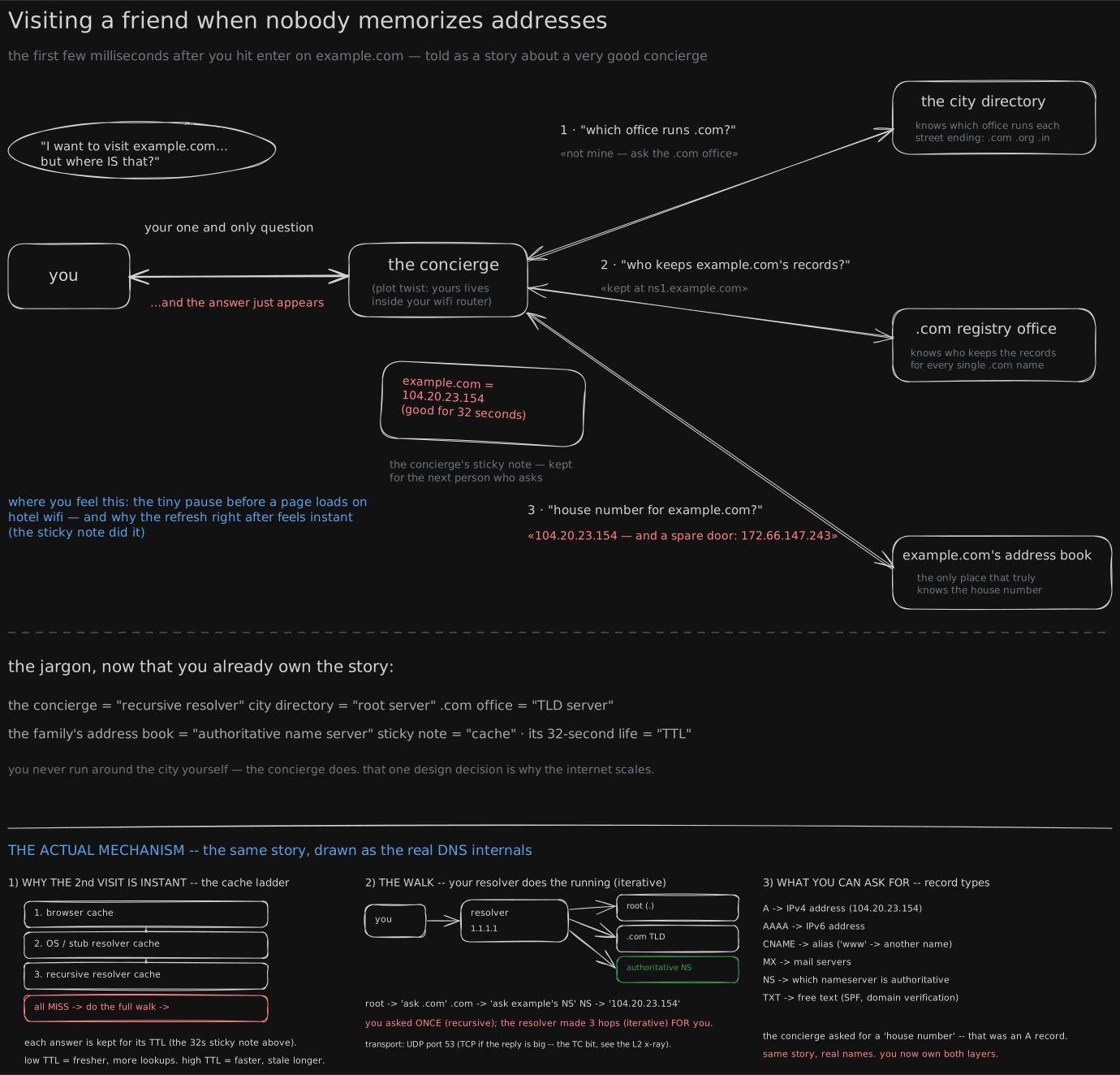
Before you start. This is the first lesson in the series, so nothing earlier is assumed. You’ve typed a web address into a browser and watched a page appear; that’s the whole starting point, and everything below explains what happens in between.
1970s: one file, copied to every machine on the network
Before the early 1980s, every computer on the ARPANET, the network the internet grew from, kept an identical copy of one file, HOSTS.TXT, whose only job was saying which name belonged to which machine.
Adding a computer meant phoning the Network Information Center at the Stanford Research Institute, in Menlo Park, business hours only, where a person typed the new line into the master copy. Every other machine fetched the updated file to see it.
That worked at a few hundred machines. By the early 1980s the network was growing weekly and the phone-call-and-retype process could not keep up. A single list had to be replaced with something that scaled.
1983: the fix that keeps no list at all
The fix landed on Paul Mockapetris, at the University of Southern California’s Information Sciences Institute. His answer that year, DNS (the Domain Name System), sounds backwards at first: instead of a bigger, faster single list, a system with no complete list anywhere. Every machine only ever knows a small piece, plus who to ask next - and the board draws that as an ordinary human errand: you don’t run around the city gathering an address yourself, you ask one person who knows who to ask, and they carry the question the rest of the way.
Two words are worth being precise about, because DNS exists only to connect them. A name is what you type, like example.com: chosen by a person, memorable, movable - the same name can point somewhere new tomorrow. An address is what a machine actually delivers to, a number like 104.20.23.154, belonging to whoever is renting that slice of the network right now (Inside your building (your router's life) opens up what those numbers look like). The wires and machines moving data between computers (How a parcel finds any house on earth) only ever read addresses, so something has to turn a name into one before anything can be sent. That something is DNS.
The concierge, and the three people behind them
Picture a hotel concierge: you don’t know the city, so you ask the one person at the desk, who makes however many calls it takes and comes back with your answer. That’s your resolver, usually software your internet provider runs, or a public one like 8.8.8.8.
The resolver doesn’t know most answers either. It knows who to ask first: a fixed list of thirteen machines, the root, the city directory of the whole internet. The root doesn’t know your answer, but knows which office handles every .com address, so it sends the resolver to the .com registry. The registry doesn’t know the final address either; it knows which office looks after example.com’s own records, so it points one hop further, to example.com’s own authoritative server, the one place that keeps that domain’s own address book.
“I don’t know, ask them” is a referral, and it is the entire mechanism: nobody at any level knows everything, each one knows only the next name down the chain, which is what let a system built in 1983 keep working for a network now billions of machines larger.
sequenceDiagram
    participant You as Your laptop
    participant R as Concierge (resolver)
    participant Root as City directory (root)
    participant TLD as .com registry
    participant Auth as example.com's own book (authoritative)
    You->>R: example.com?
    R->>Root: example.com?
    Root-->>R: referral: ask the .com registry
    R->>TLD: example.com?
    TLD-->>R: referral: ask example.com's own server
    R->>Auth: example.com?
    Auth-->>R: 104.20.23.154
    R-->>You: 104.20.23.154
Your laptop only ever talks to the concierge. Every referral above is the concierge walking the chain on your behalf, one hop at a time, handing you back a single answer at the end.
One question for you, more questions for the concierge
What you asked for and what the concierge did are two different kinds of question, worth naming because it explains why a root server answers strangers all day. You asked for a finished answer - do the whole job, come back with the address. That’s recursive. The concierge’s questions to the root and the registry are iterative - tell me what you know, and if that’s “ask someone else,” fine, I’ll go there myself - a job a root server does for free, because it costs nothing: no walking, no memory, one instant reply (DNS on the wire shows the single bit that tells the two apart).
The sticky note that makes it fast
Walking the whole chain takes real time, around a fifth of a second, and a single page can touch a dozen names. Nobody could wait for that on every load, so the concierge writes the answer on a sticky note before handing it back, and the next person asking the same question gets the note instead of a fresh walk.
That note doesn’t last forever. It comes with a TTL, time to live: the number of seconds the concierge is allowed to trust it before throwing it away and asking again. Measured on this machine, asking for a name nobody nearby had looked up recently, then asking again twice more:
$ dig @1.1.1.1 openbsd.org A     # cold - the resolver has to walk
;; Query time: 435 msec
$ dig @1.1.1.1 openbsd.org A     # again
;; Query time: 344 msec
$ dig @1.1.1.1 openbsd.org A     # and again
;; Query time: 14 msec
The first ask pays for the whole walk: 435 milliseconds (a millisecond is a thousandth of a second - 435 of them is nearly half a second, long enough to notice). The third ask is 14 milliseconds, over thirty times faster, because it never leaves the building; it’s just reading the sticky note. That’s almost the entire performance story of DNS: the walk is expensive, so the system is built to almost never take it.
You now know
- DNS replaced a single master file, HOSTS.TXT, that had to be phoned in and copied to every machine, a design that could not survive a network that kept growing.
- Its fix is a system with no complete list anywhere: every machine knows a small piece, plus exactly who to ask next.
- Your laptop asks one thing, the resolver (the concierge), which walks the chain: root, then the
.comregistry, then the domain’s own authoritative server. - “I don’t know, ask them” is called a referral, and it’s the entire mechanism that lets the chain scale to the whole internet.
- The resolver’s answer gets written down and reused for a TTL, its time-to-live in seconds, which is why almost no real page load pays for the full walk.
Stop here if you want. What follows is the same walk, watched happening on a real machine, in numbers.
Second read: the walk, the flag, and the trade
Watching the referral chain, live
dig +trace makes your own machine do the resolver’s job instead of delegating it, so every referral in the chain above is visible on the screen:
$ dig +trace example.com. 512220 IN NS a.root-servers.net. ... m.root-servers.net.
;; Received 525 bytes from 1.1.1.1#53(1.1.1.1) in 27 ms
com. 172800 IN NS a.gtld-servers.net. ... m.gtld-servers.net.
com. 86400 IN DS 19718 13 2 8ACBB0CD28F41250A80A491389424D34...
;; Received 1171 bytes from 2001:500:a8::e#53(e.root-servers.net) in 51 ms
example.com. 172800 IN NS hera.ns.cloudflare.com.
example.com. 172800 IN NS elliott.ns.cloudflare.com.
example.com. 86400 IN DS 2371 13 2 C988EC423E3880EB8DD8A46FE06CA230...
;; Received 506 bytes from 2001:500:856e::30#53(d.gtld-servers.net) in 84 ms
example.com. 300 IN A 104.20.23.154
example.com. 300 IN A 172.66.147.243
;; Received 179 bytes from 2a06:98c1:50::ac40:20a2#53(hera.ns.cloudflare.com) in 18 msFour stages, matching the four hops above:
- Root hints. The thirteen root server names,
a.throughm.root-servers.net, fetched here from1.1.1.1but normally shipped inside the resolver as a built-in list. The one piece not learned by asking;512220is how many seconds it may be kept, about six days. - Root, 51 ms. Zero address records, thirteen
.comname servers instead: a referral written out. - Registry, 84 ms. Zero address records again, just two names at
ns.cloudflare.com. - Authoritative, 18 ms. Only here does an address appear - and this hop is the fastest of the three, the first surprise: the “final, deepest” server answered quickest, because Cloudflare runs name servers everywhere and the root you happened to reach was not nearby (why is in One address, a thousand doors).
27 + 51 + 84 + 18 = 180 ms to walk it with nothing cached: four round trips, real network time each - the number the sticky note protects you from.
The DS lines are DNSSEC. Each one is a signature: the office one level up vouching that the next referral is genuine, so nobody sitting on the wire between you can slip in a fake one - the same “each link vouches for the next” shape as the certificate chain in The whisper code (how a call goes private), applied to names instead of keys.
One flag decides recursive or iterative
Your question carries a flag, RD (“recursion desired”), set to 1. The concierge’s own questions to the root and the registry carry RD = 0. Ask a root server directly with recursion switched off, and it answers exactly as it does for a resolver: nothing but a referral.
$ dig @198.41.0.4 example.com A +norecurse;; ->>HEADER<<- opcode: QUERY, status: NOERROR, id: 53732
;; flags: qr; QUERY: 1, ANSWER: 0, AUTHORITY: 13, ADDITIONAL: 27flags: qr alone: no rd (you didn’t ask for recursion), no ra (it doesn’t offer it), no aa (it isn’t authoritative for example.com). ANSWER: 0, AUTHORITY: 13 is the referral itself.
The 27 additional records are glue: the actual addresses of those thirteen .com servers, sent along unasked. Without glue you’d be told “ask a.gtld-servers.net” and then have to resolve that name to reach it, which needs .net, another walk - glue solves that chicken-and-egg by attaching the addresses to the referral itself.
How much of the walk a TTL actually saves
A cache holding a record with TTL T seconds, asked q times a second, walks the chain once every T seconds and answers from the sticky note the rest of the time:
 hit fraction = 1 − 1 ÷ (q × T)

 q = 1/s,   T = 300 s   →  1 − 1/300   = 99.7%   (one walk in 300)
 q = 1/s,   T = 60 s    →  1 − 1/60    = 98.3%
 q = 1/min, T = 60 s    →  1 − 1/1     = 0%      (every question is a walk)
q = 100/s, T = 5 s → 1 − 1/500 = 99.8% (a short TTL is fine on a busy name)example.com’s TTL of 300, asked once a second, means one walk every five minutes: 180 ms × (1/300) ≈ 0.6 ms of walking per query on average - which is why the 14 ms round trip, not the 180 ms walk, is the number a page actually pays.
The board draws this as a ladder: browser cache, then the operating system’s cache, then the resolver’s cache. A hit at any rung stops the descent; only a miss at every rung reaches the root.
A countdown that goes backwards. Sample the same record’s TTL from 1.1.1.1 once a second; it should fall by one each time:
$ for i in $(seq 1 8); do dig @1.1.1.1 +noall +answer wikipedia.org A; sleep 1; donet=0s wikipedia.org. 44 IN A 103.102.166.224
t=1s wikipedia.org. 28 IN A 103.102.166.224
t=2s wikipedia.org. 12 IN A 103.102.166.224
t=3s wikipedia.org. 98 IN A 103.102.166.224
t=4s wikipedia.org. 74 IN A 103.102.166.224
t=5s wikipedia.org. 58 IN A 103.102.166.224
t=6s wikipedia.org. 73 IN A 103.102.166.224
t=7s wikipedia.org. 68 IN A 103.102.166.224It falls 44 → 28 → 12, sixteen a second rather than one, then jumps back to 98. A countdown cannot go up. The sixteen-a-second drop is just sampling - each dig is its own round trip, and sleep 1 is a floor on the wait, not a fixed period. But the jump back isn’t sampling: “the resolver” was never one machine. 1.1.1.1 is one address answered from hundreds of sites, many machines behind each, every one keeping its own sticky note, written at its own moment. Consecutive questions land on different machines, so you read a different note each time - why a changed DNS record reaches users at different times: every cache runs its own clock.
An absence gets cached too
A name that doesn’t exist costs just as much to find out as one that does - the resolver still has to walk to the authoritative server to be told “no” - so the “no” gets a sticky note as well:
$ dig @1.1.1.1 this-name-does-not-exist-chalk-test.com A
;; ->>HEADER<<- opcode: QUERY, status: NXDOMAIN, id: 60691
;; flags: qr rd ra; QUERY: 1, ANSWER: 0, AUTHORITY: 1, ADDITIONAL: 1

$ dig @1.1.1.1 +noall +authority this-name-does-not-exist-chalk-test.com A
com.  900  IN  SOA  a.gtld-servers.net. nstld.verisign-grs.com. 1788594633 1800 900 604800 900
NXDOMAIN is “no such name.” The record’s last field, 900, is the negative TTL: cache this absence for 15 minutes - why a freshly created subdomain can stay unreachable for a quarter hour on a machine that tried it one minute too early.
What else you can ask for, and two TTLs in one reply
A type is a number in the question itself: type 1 means “give me an address”; a different type gets a different shape of answer back.
$ dig +short google.com MX
10 smtp.google.com.

$ dig +noall +answer www.github.com A
www.github.com.  1209  IN  CNAME  github.com.
github.com.        60  IN  A      20.207.73.82
The first line asks MX, the record naming where to deliver email: smtp.google.com is the mail server, 10 its priority. The second asks for an address and gets a forwarding note first, a CNAME (“www.github.com is really github.com”), then that name’s own address in the same reply - www.github.com has no address of its own, and the resolver followed the pointer rather than making you ask twice.
The two TTLs are far apart on purpose: “www is really us” almost never changes, so twenty minutes costs nothing; “we’re at this address” might change in the next minute, during a deploy or failover, so it’s cached for one. Low TTL re-asks constantly but switches fast; high TTL means fewer walks but a slower change - the same trade any cache makes (The slate next to the stove (caching) at a different scale; the lookup itself is the same O(1) trick as Hashing).
Before a planned migration, the standard move is to drop the TTL a full day ahead so the old, long-lived copies expire while nothing else is happening, then switch, then raise it back. Drop it at the same moment you move the address instead, and the caches still holding the old answer are also still holding the old TTL - they won’t notice for as long as that said.
Try it
dig +trace example.comWatch the root referral, the .com referral, and the final answer arrive in front of you.
# 1. a referral, with recursion switched off - ANSWER: 0, AUTHORITY: 13
dig @198.41.0.4 example.com A +norecurse

# 2. cold vs warm. pick a name nobody near you has looked up lately,
#    and run it three times. watch "Query time" collapse.
dig @1.1.1.1 openbsd.org A | grep "Query time"

# 3. the TTL that will not count down cleanly - you are reading a
#    different machine's sticky note each time (lesson 0010)
for i in $(seq 1 8); do dig @1.1.1.1 +noall +answer wikipedia.org A; sleep 1; done

# 4. a cached "no": NXDOMAIN, and the SOA whose last field is how long
#    the absence is remembered
dig @1.1.1.1 this-name-that-does-not-exist.com A
dig @1.1.1.1 +noall +authority this-name-that-does-not-exist.com A
And one more, on a name you own if you have one: dig +noall +answer www.<yourdomain> A, and read the two TTLs. If the alias and the address share the same number, ask yourself whether that was a decision or a default.
Go deeper
- Primary source: Cloudflare - What is DNS?
- visual companion: Julia Evans - Life of a DNS query
- history: Wikipedia - Domain Name System.
Related
How a parcel finds any house on earth is what actually carries every one of these questions and answers once an address is known. DNS on the wire is the single bit, and the rest of the message, this lesson only described in words.
Retrieval practice
8 questions. Answer each one before you open it.
Why does your laptop only ever talk to one machine during a lookup, even though the answer might take four hops to find?
It delegates the whole job to the resolver (the concierge). Your laptop asks a recursive question - do the whole job and come back with an answer - and the resolver does the walking: root, then the .com registry, then the authoritative server, on your behalf.
The root server doesn’t know example.com’s address. What does it send back instead?
A referral: the list of name servers responsible for the .com registry, with zero address records - “I don’t know, ask them” is the entire answer.
Your friend visits example.com ten seconds after you did. Which of the four hops actually happen for them?
None of them, if your TTL hasn’t expired yet - the resolver answers straight from its sticky note. Only once the TTL runs out does the next question have to walk the chain again.
What’s the one flag that separates the question you ask your resolver from the question your resolver asks the root, and why would the root refuse the other kind?
RD, “recursion desired.” Your question sets RD to 1: do the whole job, hand back an answer. The resolver’s questions to the root and registry set RD to 0: tell me what you know, I’ll follow it myself. A root server answers flags: qr alone, no ra (“recursion available”), because it has no cache and no interest in walking other zones for anyone.
A referral from the root arrives with ANSWER: 0, thirteen .com name servers, and 27 extra records nobody asked for. What are those extra records, and what breaks without them?
They’re glue: the addresses of those thirteen .com servers, attached unasked. Without them, reaching a.gtld-servers.net would need another walk through .net - glue breaks that chicken-and-egg.
Sampling the same name’s TTL once a second gives 44, 28, 12, then 98. A countdown that jumps back up isn’t a countdown. What’s actually happening?
There’s no single machine behind 1.1.1.1; it’s one address answered from hundreds of sites, every machine keeping its own sticky note. Consecutive questions land on different machines, so each reading is a different note. This is also why a changed DNS record reaches different users at different times: every cache in the chain keeps its own clock.
www.github.com returned a CNAME with a TTL of 1209 seconds and an address with a TTL of 60 in the same reply. Why would one operator choose two TTLs three orders of magnitude apart?
The two records state facts with very different rates of change. “www really is github.com” is structural and barely ever changes, so caching it for twenty minutes costs nothing. “github.com is at this address” might need to change in the next minute, for a deploy or a failover, so it’s cached for one. A low TTL buys the ability to move fast at the cost of more lookups; a high TTL buys speed at the cost of a slower change.
You need to move a domain to a new address next Tuesday. Why is lowering the TTL on Tuesday morning already too late?
Because caches still holding the old address are also still holding the old TTL. Lowering the number today only affects copies handed out from now on; a resolver that fetched the record yesterday under a 24-hour TTL keeps it for up to 24 more hours regardless. Drop the TTL a full old-TTL-length ahead, so long-lived copies expire while nothing is happening yet, then switch, then raise it back.