The Choices Before the Requirements
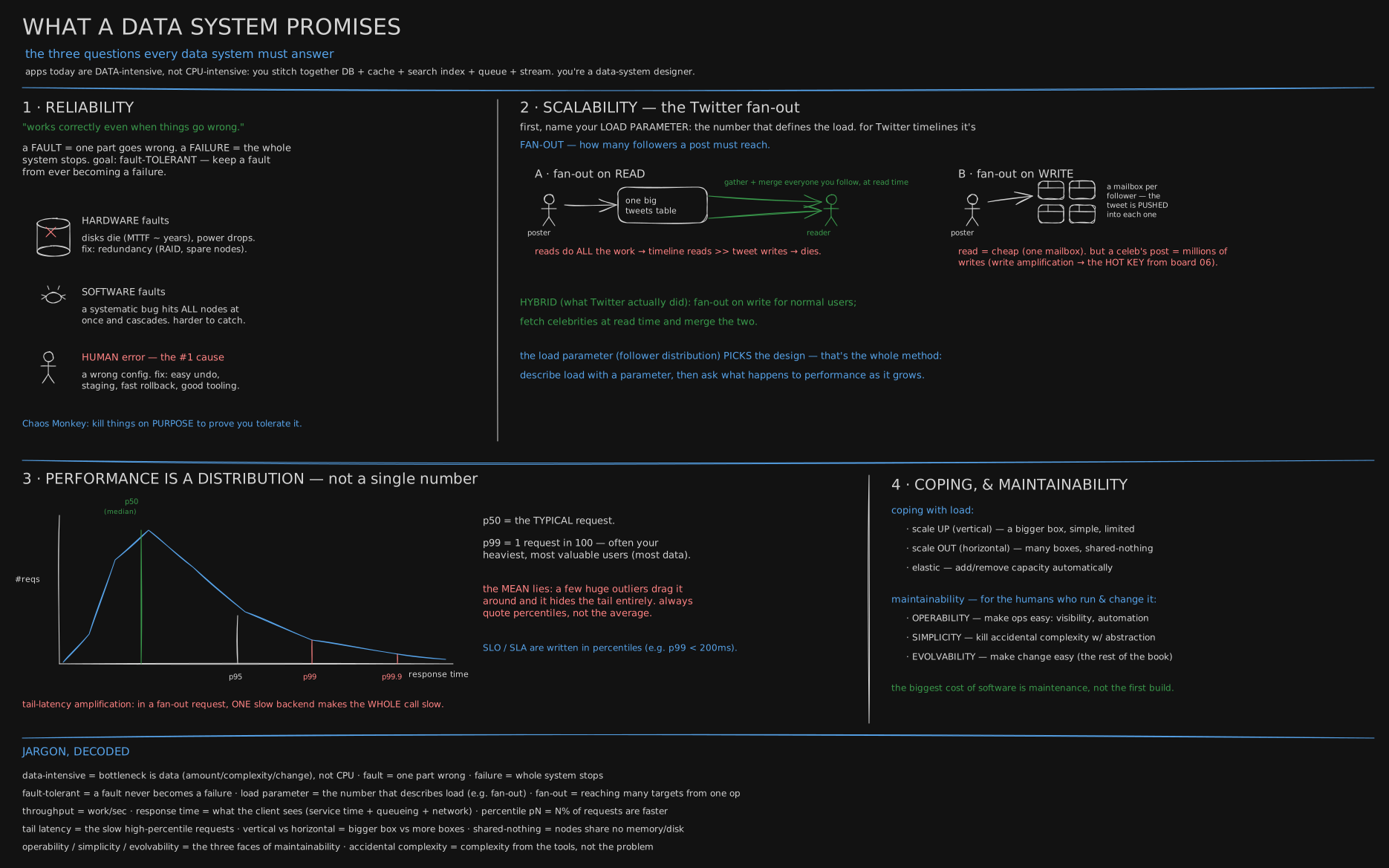
The board’s first line says it plainly: an app today is a database plus a cache plus a search index plus a queue, stitched together, and whoever stitches them is designing a data system. This lesson is about the choices made before that stitching starts: what job the data is for, where it lives, who runs the machines, and whether it needs more than one.
Before you start. Nothing from earlier lessons; this one opens the track. You only need to have used an app that remembers things, an order history, a feed, a bank balance, and to know that somewhere a computer is keeping those things for you.
May 2015: a laptop against 128 cores
On 19 May 2015, at a small systems workshop held in a former monastery in Switzerland, three researchers, Frank McSherry, Michael Isard and Derek Murray, presented a paper with an unfriendly title: “Scalability! But at what COST?”
They had taken the published results of big data systems, software built to spread one job across many computers, and asked a question those papers rarely asked. Not “how much faster does it get when you add machines?” but “is it faster than one ordinary computer doing the job by itself?”
The job was a standard one: rank every account in a Twitter follower graph by how many important accounts follow it, the calculation Google once used to rank web pages. The graph had 41 million accounts and 1.47 billion follow links. One published system, Spark, had reported doing twenty rounds of that ranking on 128 processor cores in 857 seconds. McSherry wrote the same calculation as a plain program running on one core of a 2014 laptop, reading the graph from the laptop’s own disk. It took 300 seconds.
One core beat 128. Not because the big systems were badly built, but because splitting a job across machines has a bill: the pieces have to talk, wait for each other, and agree on who has what. A system can look wonderful as you add machines simply because it wasted so much on the first one. The paper’s name for the honest test was COST: how many cores does the big system need before it beats one good thread? For several systems, none of the configurations their own authors had reported beat it.
That is the first choice this lesson is about, and the one people skip. Before arguing about which database, ask whether you need more than one machine at all.
The till and the back office: transactions and analytics
Picture a small chain of shops. At the counter, the till does one thing over and over: record this sale, now, correctly. Look up one customer. Take one payment. Each job touches a handful of rows, and a customer is standing there waiting, so it must finish in milliseconds.
Once a month, someone in the back office asks a different kind of question. Which shop sold the most last quarter? Which product is shrinking? Each question touches every sale ever made, but only two or three facts about each one, and nobody minds if the answer takes a minute.
Those are two different workloads, and they want different machinery. The till’s work, many small reads and writes by key, is called transaction processing, or OLTP (online transaction processing). The back office’s work, a few huge reads that add up millions of rows, is called analytics, or OLAP (online analytical processing). One database can do both while the business is small. As it grows, a long analytics query scanning every sale starts slowing down the till, and the people asking monthly questions want data from five other systems too. So the usual move is a second copy, shaped for analytics: transaction processing stays on the till’s database, and analytics moves to its own.
Where the back office keeps its paper: warehouse or lake
That second copy has two common shapes.
The first is a data warehouse: a separate database that every system’s data is copied into, cleaned up and arranged into tidy tables first, so that anyone can ask a question in plain SQL. It is the back office with a filing clerk. Everything is in the right folder, labelled, and in the same format. The cost is the clerk: someone has to decide the folders before the paper arrives, and a question the folders did not plan for is hard to ask.
The second is a data lake: dump everything, raw, in whatever format it arrived, into cheap storage, and sort it out when someone needs it. It is the back office with a big box of receipts. Nothing is lost and nothing had to be planned, which is why data scientists like it. The cost is the opposite one: every person who opens the box has to make sense of it again, and a lake nobody tends becomes a swamp.
Most large companies end up with both: the lake keeps everything raw, and the warehouse holds the cleaned-up part that most questions need. A newer middle road puts warehouse-style tables directly on top of the lake’s files; the second half of this lesson names it.
October 2022 and March 2023: rent or own, one machine or many
Two public posts, five months apart, are about the other two choices.
On 19 October 2022, David Heinemeier Hansson, partner and chief technology officer at 37signals, the company behind the Basecamp and HEY apps, published “Why we’re leaving the cloud”. The cloud means renting computers by the hour from a company like Amazon, and letting it run the database and the search engine for you. His company was paying, in his words, “over half a million dollars per year” for Amazon’s database and search services alone. His argument was not that the cloud is bad. It was that the cloud excels at two ends. One end is an app “so simple and low traffic” that renting saves real work. The other is a load that is “highly irregular”, quiet most days and enormous on a few. A medium-sized company with steady, predictable growth sits at neither end, and for it, he argued, renting forever costs more than buying machines and running them yourself.
On 22 March 2023, an engineer on Amazon’s own Prime Video team, Marcin Kolny, published the opposite surprise from inside Amazon. Their tool that watches live video streams for glitches had been built from many small rented pieces, each running on its own, passing every video frame between them through Amazon’s S3 storage. It hit “a hard scaling limit at around 5% of the expected load”, and every hand-off between pieces cost money. They moved all the pieces into a single program on ordinary rented servers. Their infrastructure cost fell “by over 90%”.
Notice what each post did and did not say. Hansson left rented machines but kept running many machines. Prime Video stayed on rented machines but collapsed many pieces into one. Those are two separate dials. One is managed or self-hosted: does a provider run the database for you, or do your own people? The other is single-node or distributed: does one machine do the work, or many machines that have to coordinate? A distributed system buys three things one machine cannot give you: surviving the loss of a machine, being close to users on several continents, and holding more than one machine can hold. It pays for them with the bill McSherry measured.
The choice nobody gets to make: where the data may live
One more choice is made for you, by law. Since 25 May 2018, a European regulation, the GDPR, has given people in the EU rights over data about them, including, in some cases, the right to have it erased. Some countries require certain kinds of data to stay inside their borders. So “which machine?” can have a legal answer before it has a technical one: a copy of customer data in a cheap region abroad, or a raw lake that keeps every record forever, can be a choice the business is not allowed to make. Later in this track, a lesson takes deletion head on, including how to delete from a log that was built never to forget.
You now know
- Splitting work across many machines has a cost before it pays off: in 2015, one laptop core ran a published graph job in 300 seconds that 128 cores had taken 857 seconds to do.
- Transaction processing (OLTP) is many small, fast reads and writes for someone waiting; analytics (OLAP) is a few huge reads over everything. They usually end up in separate copies.
- A data warehouse cleans and arranges data before anyone asks; a data lake keeps everything raw and makes each reader sort it out.
- Who runs the machines (managed or self-hosted) and how many machines do the work (single-node or distributed) are two separate choices.
- Renting suits tiny or wildly uneven loads; steady, predictable load is where owning can win.
- The law can decide where data may live, and whether it must be deletable, before engineering gets a say.
Stop here if you want. What follows is the same five choices worked against five small made-up companies, with the arithmetic, and a script that measures what one core of your own machine can do.
Second read: five companies, five sets of choices
The COST table, from the paper. Twenty rounds of ranking on the Twitter graph (41,652,230 accounts, 1,468,365,182 follow links, 5.76 GB), as the paper’s Table 2 reports them. The first rows are times other papers published for their systems; the last two are the authors’ own single-threaded runs on a 2014 laptop:
system                cores   seconds
Spark                   128       857
Giraph                  128       596
GraphX                  128       419
GraphLab                128       249
Single thread (SSD)       1       300
Single thread (RAM)       1       275
Spark used 128 cores to take 2.9 times as long as one core (857 ÷ 300). Counted as core-seconds, the work the machines spent, it is 128 × 857 ÷ 300 ≈ 366 times as much. Only GraphLab beat one thread here, and the paper’s point was the baseline, not the systems: a scaling chart with no single-machine line on it does not say whether the scaling was worth buying. It does not prove that a cluster is never worth it; the paper’s own graphs fit on one laptop, and plenty of real data does not.
Five companies. All five are made up, with numbers picked to land on different answers, not measured from any real company. For each, decide three things: one machine or many, managed or self-hosted, and whether analytics needs its own copy. Then open the answer.
A. A bakery chain. 40 shops, about 50 orders a shop a day, three developers, five years of history. That is 40 × 50 × 365 × 5 = 3,650,000 orders; at about 1 KB each, 3.65 GB in total. Writes average 2,000 a day, about one every 43 seconds.
A: the answer
One machine, managed. 3.65 GB fits in the memory of a small server several times over, and one write every 43 seconds is nothing. Three developers should not be running a database at 3 a.m.; a managed Postgres with automatic backups is the cheapest thing they can buy. Analytics can read from a replica of the same database for years before it needs a warehouse.
B. A ride app in one city. 2,000 drivers, each phone sending its position every 4 seconds, about 100 bytes each. That is 2,000 ÷ 4 = 500 writes a second and 500 × 86,400 × 100 bytes ≈ 4.3 GB a day, most of which nobody needs after the ride ends.
B: the answer
One machine for the live data, with a replica for failover. 500 small writes a second is comfortable for one well-sized database, and a driver’s last position is the only one the app reads. The 4.3 GB a day of old positions belongs in cheap storage, a small lake, for the occasional analysis, and should be deleted on a schedule unless there is a reason to keep it. Managed or self-hosted depends on whether the team has someone who wants to run databases.
C. A sensor company. 100,000 devices, each sending a 200-byte reading every 10 seconds. That is 10,000 writes a second, 10,000 × 86,400 × 200 bytes ≈ 173 GB a day, about 63 TB a year.
C: the answer
Distributed, for the storage at least. 63 TB a year outgrows any single machine’s disks within a year or two, and 10,000 writes a second, every second, wants the appending kind of storage engine the storage-engines lesson describes. Raw readings go into a lake in cheap object storage; a warehouse holds per-hour summaries that people actually query. Managed is the usual answer here: running a large distributed store well is a full-time job for several people.
D. An exam results site. Five million students check their results, and nearly all of them do it in the hour the results are published, once a year. That is 5,000,000 ÷ 3,600 ≈ 1,389 requests a second at the peak, and an average over the year of about 0.16 a second: the peak is 8,760 times the average.
D: the answer
Rented and managed, and sized for the peak only during the peak. This is Hansson’s “highly irregular” end exactly: owning machines big enough for one hour a year means paying for idle machines the other 8,759 hours. The data itself is small (five million rows), so the answer may still be one database, with the results copied out ahead of time into a cache or as static pages that the rented machines serve.
E. A steady software company. 200 million rows of about 500 bytes, 100 GB, growing about twofold a year, so roughly 800 GB in three years. Traffic is steady, growth is predictable, and the team includes two people who like running infrastructure.
E: the answer
The case where self-hosting can win, and it is the 37signals argument: predictable load, a large and steady bill for managed databases, and people who can run them. 800 GB still fits on one large machine with a replica, so this is a single-node database for now, self-hosted or managed depending on the price and on whether those two people stay. The bill is the reason to look; it is not proof. Run the numbers with the staff cost included before moving anything.
The lakehouse. The middle road from the story has a name: a lakehouse keeps the data as files in the lake’s cheap storage, in a column format, and adds a table layer on top (Apache Iceberg and Delta Lake are the common ones) that records which files make up a table, so a warehouse-style query engine can treat the files as tables with transactions. It gives up some of a warehouse’s speed to keep one copy of the data instead of two.
What “distributed” buys, said precisely. Three reasons, and a design should name which it is paying for. Fault tolerance: a second machine that can take over when the first dies, which is replication, later in this track. Latency: a copy near users on another continent, so a request does not cross an ocean twice. Scale: more data, or more writes, than one machine holds, which is partitioning, also later. If none of the three applies, the distributed version is mostly the COST bill.
Try it
How much can one core of your own machine do? This sums 20 million made-up orders per shop, in one thread:
cd teaching/code/data-systems
python3 one_machine.py
Run it yourself: full source file
- Install Python 3. Check it with
python3 --version. - Make the folder:
mkdir -p teaching/code/data-systems. Save the file below at the path shown above it, including any subfolders. - Run the commands in the block above from the folder where you ran mkdir.
teaching/code/data-systems/one_machine.py# how much can one thread on this machine do before you need a second machine?
# made-up data: 20 million orders across 1,000 shops, summed per shop
import time
import numpy as np
rng = np.random.default_rng(1)
n = 20_000_000
shop = rng.integers(0, 1_000, n, dtype=np.int32)
amount = rng.random(n, dtype=np.float32) * 50
t = time.perf_counter()
per_shop = np.bincount(shop, weights=amount, minlength=1_000)
secs = time.perf_counter() - t
mb = (shop.nbytes + amount.nbytes) / 1e6
print(f"rows {n:,} data in memory {mb:,.0f} MB")
print(f"sum per shop, one thread: {secs:.3f} s = {n / secs / 1e6:,.0f} million rows a second")
print(f"busiest shop total {per_shop.max():,.0f} quietest {per_shop.min():,.0f}")Run 2026-10-17 on an Apple M4 laptop (numpy installed):
rows 20,000,000   data in memory 160 MB
sum per shop, one thread: 0.074 s  = 271 million rows a second
busiest shop total 512,432   quietest 487,068
A second run straight after printed 0.050 s, 401 million rows a second: timing a job this short moves with whatever else the machine is doing, so run it three times and take the middle one. Then compare with the companies above. The bakery chain’s whole five-year history is 3.65 million orders, under a fiftieth of a second at either speed. Change n to 200 million and watch the memory line pass 1.6 GB; that is 55 times the bakery chain’s five-year order count, and on the same M4 it took 2.4 seconds (83 million rows a second, run 2026-10-17). Still one machine, still seconds.
Then do the exercise on something real you use: name its load, whether it needs analytics separate from transactions, and which of the three reasons for going distributed actually applies.
Go deeper
- Further reading: Martin Kleppmann and Chris Riccomini, Designing Data-Intensive Applications, 2nd edition (O’Reilly, 2026), the opening chapter on trade-offs in data systems architecture
- McSherry, Isard and Murray, “Scalability! But at what COST?” (HotOS XV, 2015)
- David Heinemeier Hansson, “Why we’re leaving the cloud” (19 October 2022)
- Marcin Kolny, “Scaling up the Prime Video audio/video monitoring service and reducing costs by 90%” (22 March 2023).
In the book, this is new in the second edition; the first edition’s nearest ground is the opening of Reliable, Scalable, and Maintainable Applications.
Related
- What a Data System Promises is the next lesson: having chosen the shape of the system, name the number that is growing and the promises it must keep.
- Storage Engines is later in this track and explains why analytics wants its data stored by column.
- The rooms AWS runs for you is what a managed service actually takes off your hands, room by room.
- Regions, AZs & the Backbone is where rented machines physically live, and why the region you pick is also a legal choice.
- The full Data Systems list is in CURRICULUM.
Retrieval practice
7 questions. Answer each one before you open it.
What did “Scalability! But at what COST?” measure, and what is the one-sentence lesson?
It compared published big data systems against one well-written single-threaded program on the same job. On twenty rounds of ranking a 1.47-billion-link Twitter graph, Spark on 128 cores took 857 seconds and one laptop core took 300. The lesson: distribution has overheads, so ask how many cores a system needs before it beats one good thread, and whether you need more than one machine at all.
Transaction processing versus analytics: what does each workload look like, and why do they usually end up in separate copies?
Transaction processing (OLTP) is many small reads and writes by key, for a person who is waiting, so each must finish in milliseconds. Analytics (OLAP) is a few large queries that read a few columns of every row and add them up. One long analytics scan on the transactional database slows everyone waiting on it, and analysts want data from many systems, so analytics moves to its own copy.
Data warehouse versus data lake: what does each do with incoming data, and what does each cost?
A warehouse cleans and arranges data into planned tables before anyone queries it, so questions are easy in SQL, but someone has to design those tables first and an unplanned question is hard. A lake stores everything raw and cheaply, so nothing is lost and nothing had to be planned, but every reader has to interpret the raw data again, and an untended lake becomes unusable.
37signals left the cloud and Prime Video moved to a single process. Why are those two different decisions?
They turned different dials. 37signals changed who runs the machines: from rented, managed services to their own hardware, keeping many machines. Prime Video kept renting from AWS but collapsed many separately running pieces into one program on ordinary servers. Managed versus self-hosted, and single-node versus distributed, are independent choices.
According to Hansson’s post, at which two ends does the cloud excel, and why does a steady medium-sized company sit at neither?
An app so simple and low-traffic that renting saves real complexity, and a load that is highly irregular, where you would otherwise own machines that sit idle. A medium-sized company with predictable growth needs roughly the same machines every month, so it pays the rental margin forever without using the elasticity it is paying for.
Name the three things a distributed system buys that one machine cannot, and what it pays for them.
Fault tolerance (another machine takes over when one dies), lower latency for users far apart (a copy near each of them), and scale beyond one machine’s disk, memory or write rate. It pays in coordination: machines have to talk, wait and agree, which is the overhead the COST paper measured.
Why can the law decide a data architecture before engineering does?
Rules such as the GDPR, in force since 25 May 2018, give people rights over their data, including erasure in some cases, and some countries require certain kinds of data to stay inside their borders. A copy in a foreign region, or a raw lake that keeps every record forever, can be something the business is not allowed to do, whatever it would cost.