The Shipping Container (Docker)
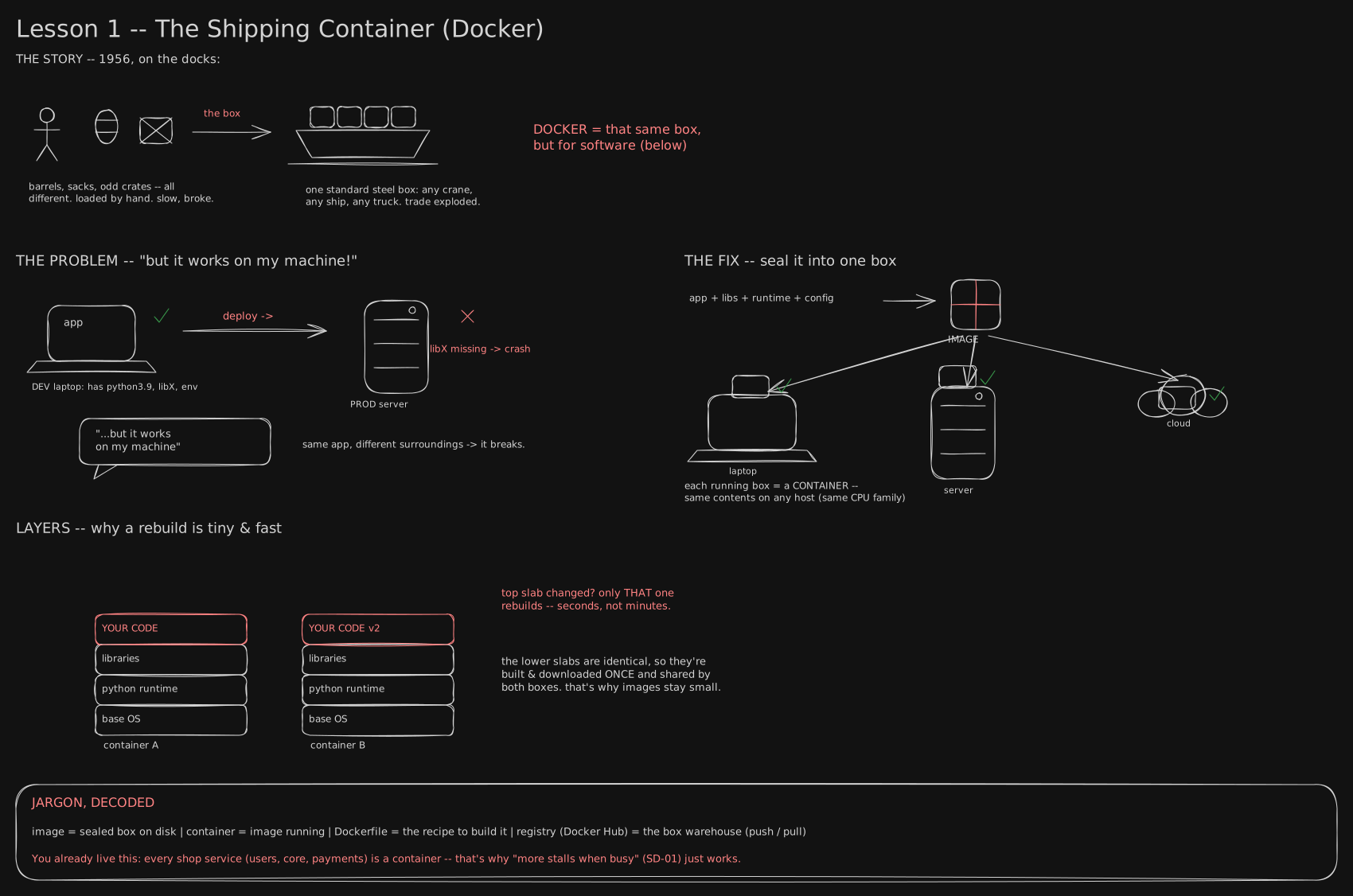
The first board of the DevOps track, opening Track 4. This lesson is about the sealed box software ships in now, why a hundred of those boxes can cost about as much disk as one, and the two things the box quietly does not seal in.
Before you start. This is the first lesson of the DevOps track, so nothing earlier is assumed. You only need the ordinary experience of a program that runs fine on your own machine and falls over somewhere else - that gap is the whole subject.
1956: cargo, loaded by hand, and lost at sea
Before 1956, a ship left port carrying crates, barrels and sacks, every one a different shape, loaded by hand, one at a time, by dockworkers called longshoremen. A ship could sit in port for days while its cargo was carried aboard piece by piece, and cargo broke, went missing, or got stolen at almost every handoff between truck, dock and hold.
A North Carolina trucking owner named Malcolm McLean had a different idea: stop unloading the truck at all. Load the whole sealed trailer body onto the ship. On April 26, 1956, a converted oil tanker called the SS Ideal X left Port Newark, New Jersey, carrying 58 of McLean’s steel boxes stacked on its deck, and reached Houston five days later. Loading those 58 boxes took under eight hours. McLean’s own numbers: loading loose cargo the old way ran about $5.83 a tonne; loading it sealed in his boxes ran about 15.7 cents a tonne - nearly 40 times cheaper. The box itself was not clever. What made it work was that every crane, every ship, every truck bed agreed on its exact shape, so nobody at any handoff had to ask what was inside.
Software had the identical problem, and took fifty-seven more years to find its own version of the fix.
March 2013: two commands, an empty room, and the argument that ended
A small hosting company called dotCloud kept hearing the same complaint from its customers: an app that ran fine on a laptop broke on dotCloud’s servers, because the server had a different version of some library the laptop had. dotCloud’s engineers had half an answer. Linux could already wall one running program off from the others on the same machine, so it saw only its own files and could not touch its neighbours. That is process isolation, and it cost a page of hand-written settings every time, tied to that exact machine.
On March 15, 2013, dotCloud’s founder, Solomon Hykes, got a five-minute lightning-talk slot at PyCon in Santa Clara. About fifteen people were in the room. He opened his laptop and ran two commands: seal an app, its libraries and its settings into one file on his own machine, then start that exact file, unchanged, on a completely different machine. No manual setup on the second machine. No page of configuration. Three minutes, and the room saw what a page of prose never managed - build once, run anywhere.
The sealed file Hykes built that day is Docker’s image: a frozen copy of an app plus everything it needs, saved on disk as one named unit. Running that unit is a container - one live copy of the image, doing something. Run the same image ten times and you get ten identical containers, the way ten identical boxes come off one packing line. dotCloud open-sourced the project the same year and, before long, renamed the whole company after it: Docker, Inc.
Stacked sheets: change one line, rebuild one sheet
An image is not built in one shot. Its recipe - a Dockerfile - is a short list of steps, and each step adds one more sheet on top of the sheets before it: first the base operating system files, then whatever gets installed, then your own code. Docker calls one sheet a layer.
That is where the packing-line comparison earns its keep. Change one line of your app and rebuild, and Docker only redoes the top layer; the sheets underneath, the base operating system and whatever you installed on it, are untouched, so the rebuild is fast and the new image barely grows. Two different apps built from the same base share every sheet below their own code, the way two different boxes packed on the same line share the same crate design underneath whatever they’re carrying.
The fingerprint that lets two boxes share one sheet
Sharing a sheet safely needs one more idea. Every layer, and the small file listing an image’s layers in order, is named by running its own bytes through a fingerprint function. A byte is the smallest unit a file is measured in; one character of text is about one byte. Feed the function any file and it returns one 64-digit number, and changing a single byte inside the file changes that whole number. Docker’s fingerprint function is called SHA-256, and the fingerprint itself is a hash.
Naming something by its own hash, instead of a name a person typed, is what lets two unrelated boxes point at literally the same sheet of disk instead of two copies of it. Build two small apps on the identical base image and the base layer’s hash comes out identical in both, because the bytes are identical, so Docker keeps one copy of those bytes and lets both images point to it. What each image actually adds - ten bytes in one build, thirty-six in another, in the experiment in the second read - is the only new disk it costs.
The registry: a shelf of fingerprinted boxes
Built boxes need a shelf that both your laptop and a server can reach. That shelf is a registry - Docker Hub is the public one, and most companies also run a private one. A registry doesn’t file things by app name first; it stores layers by their hash, and keeps a small separate table mapping a human name like shop:v3 to the right set of hashes.
Push a second image built on a base the registry already holds, and the registry checks each layer’s hash before accepting anything. It already has that exact base layer, under a completely different app, so it skips the upload and points the new name at what’s already sitting on the shelf. That is why a tenth deploy from a shared base finishes in seconds while the first one took a minute: nothing crosses the wire except the handful of bytes that are genuinely new.
Where the box stops sealing
The promise has an edge worth knowing before it costs you an afternoon. An image holds files, nothing else. When a container runs, those files are read by whatever operating system is already running on that machine - the image never packs its own copy of that. So “identical everywhere” means the files are identical everywhere; what reads them is whatever the host already has.
The second gap is the chip itself. One image is built for one kind of processor, and a name like alpine:3.20 quietly points at a different image per chip, with the pull picking whichever one matches the machine asking. Build a box only for the chip in your laptop, ship it to a server with a different one, and the server refuses to start it at all - “works on my machine,” wearing a new costume.
Both gaps matter later: the operating-system gap is why a container is not a virtual machine, and the chip gap is the first thing worth checking when a box that ran everywhere suddenly won’t. Running a Container for Real is next - actually running one, and poking at the two holes a container leaves open on purpose.
You now know
- Software found cargo’s 1956 trick - everyone agrees on the shape, so nobody asks what’s inside - sealed into one file, an image, run as a container.
- An image is built in stacked sheets, layers; changing your code rebuilds only the top one.
- Every layer is named by a fingerprint of its own bytes, a hash, so unrelated images can point at one sheet on disk instead of storing two copies.
- A registry stores layers by hash and skips uploading any it already has - why a tenth deploy is fast and the first is slow.
- An image seals the files, not the operating system underneath or the chip it runs on - those still belong to the machine running it.
Stop here if you want. What follows is the same box in numbers: the fingerprint math, the exact bytes on disk, and the two commands that prove the dedupe, for when you want to see it happen.
Second read: the fingerprint, the bytes, and the two gaps
The fingerprint, by the numbers. SHA-256 gives N = 2^256 ≈ 1.16 × 10^77 possible fingerprints.
In English: a number with 78 digits. The usual estimate for atoms in the known universe is about 10^80, so this is roughly a thousandth of that, and still far beyond anything a registry will ever hold. Even a generous guess at every file ever built into any image, n = 10^20, gives n²/2 ≈ 5 × 10^39 possible pairs, so the expected accidental match is (n²/2) / N ≈ 4.3 × 10^-38 - zero, for every practical purpose. That’s why a registry can treat “same hash” as “same bytes” without comparing them.
Three images, one base, 8.82 MB total. Two Dockerfiles on the same base, each adding one tiny text file:
# Dockerfile.a                      # Dockerfile.b
FROM alpine:3.20                    FROM alpine:3.20
RUN echo "service A" > /app.txt     RUN echo "service B, a different app entirely" > /app.txt
CMD ["cat","/app.txt"]              CMD ["cat","/app.txt"]
The first hash under each image is the same 64 digits; the second lines differ, which is the whole point:
--- alpine:3.20
sha256:88b4fba61c4c714a2fc173ddf7e9324a257304696830bf41ad28ecc58c11c95f

--- chalk-demo-a
sha256:88b4fba61c4c714a2fc173ddf7e9324a257304696830bf41ad28ecc58c11c95f
sha256:ac5a850e4251fcf8127853ab65426f0e2111905da7b478afb067493435a94564

--- chalk-demo-b
sha256:88b4fba61c4c714a2fc173ddf7e9324a257304696830bf41ad28ecc58c11c95f
sha256:af89fa8a48261dc7f19647232db629ea4db10eb53cdb4fa77673730f2856a49d
docker image ls reports 8.82 MB for each, naively totalling 26.47 MB. What’s actually on disk:
$ docker system df -v
REPOSITORY     TAG      SIZE      SHARED SIZE   UNIQUE SIZE
chalk-demo-b   latest   8.82MB    8.823MB       36B
chalk-demo-a   latest   8.82MB    8.823MB       10B
alpine         3.20     8.82MB    8.823MB       0B
8,822,697 + 10 + 36 = 8,822,743 bytes total, and those 46 bytes are exact: service A is 9 characters plus a newline, 10 bytes; service B, a different app entirely is 35 characters plus a newline, 36 bytes. “Unique size” is precisely the bytes an image adds that nobody else already has. These hashes and byte counts are one run on one machine; alpine:3.20 is re-published with each patch release, so your hashes and sizes will differ while the arithmetic between them holds.
Logical versus disk. The SIZE column in docker image ls reports an image’s logical size - everything it references, shared or not. Twenty services on one 150 MB base read as 20 × 150 = 3,000 MB there, but cost about 150 + 20 × 20 = 550 MB on disk at 20 MB each. 3000 / 550 ≈ 5.5×, and that ratio grows with every service added, because the shared 150 MB is counted once on disk and once per image in the column. The 150 MB base and 20 MB per service are teaching values, not measurements, and real fleets rarely share one base this cleanly.
The registry dedupes the same way. Push image A, then image B, which shares the base layer:
$ docker push localhost:5555/demo-a:v1
ac5a850e4251: Pushed
88b4fba61c4c: Pushed
v1: digest: sha256:7fc84f4fe748d21b34aa08d7573662bf5399fb7d9959003cd775ee54350ea7f9

$ docker push localhost:5555/demo-b:v1
af89fa8a4826: Pushed
88b4fba61c4c: Mounted from demo-a       <- not uploaded. already there, by content.
v1: digest: sha256:bcf9ab81aba4bd082600a4edb5e09aed7e9d7fd84cd2095d6d5eeb5c0aaa9b16
Mounted from demo-a means the client offered the base layer’s hash first, the registry already had those bytes, and nothing crossed the wire. A pull works the same way in reverse.
Tag versus digest. A tag, shop:v3, is a mutable pointer anyone with push access can move to different bytes tomorrow. A digest, shop@sha256:20c2e6…, is the bytes: tag relates tested-to-running by trust, digest by identity - central to The Assembly Line (CI/CD). A hash is also not privacy - it proves bytes haven’t changed, not that they’re hidden, so a password baked into a layer travels to everyone who pulls the image. The Recipe (the Dockerfile) shows the cost.
One tag, many images. A tag is really an index, one image per chip:
$ docker buildx imagetools inspect alpine:3.20
MediaType: application/vnd.oci.image.index.v1+json
  linux/amd64     sha256:c64c687cbea9300178b30c95835354e34c4e4febc4badfe27102879de0483b5e
  linux/arm/v6    sha256:37753b2965043543542cd9d48cba044151052ca14fa72e6cbec4edf2a1490599
  linux/arm/v7    sha256:bd05c4d38cbeb5cfb34883906276560353a6b0282fb5c4b9dd3bd40f5143d7c3
  linux/arm64/v8  sha256:45e09956dc667c5eff3583c9d94830261fb1ca0be10a0a7db36266edf5de9e1d
docker pull silently picks the row matching your machine. (On an ARM laptop with an emulator installed, docker run --platform linux/amd64 alpine:3.20 uname -m prints x86_64 and runs anyway - a local convenience, not a property of the image. A plain server with no emulator fails.)
A running container is nothing exotic. It is an ordinary program running on the machine, which the operating system’s core (the kernel) fools into seeing only its own programs, its own network and its own folders. The part that decides what the program can see is called namespaces. The part that decides how much CPU and memory it may use is called cgroups. Processes, Threads & the Kernel has the mechanism, and VM vs Kubernetes, and what a cluster actually is is why that still isn’t a virtual machine.
Try it (2 minutes, if Docker’s installed)
docker run --rm hello-world            # pull a tiny image, run it as a container, throw it away
docker images                          # the boxes you have on disk
docker ps -a                           # containers (running + stopped)
No Docker yet? Running a Container for Real is next - running a real one and poking at ports and volumes.
Reproduce every number above (10 minutes, needs only Docker):
# 1. Content addressing: build two images, list their layers.
mkdir /tmp/imglab && cd /tmp/imglab
printf 'FROM alpine:3.20\nRUN echo "service A" > /app.txt\n' > Dockerfile.a
printf 'FROM alpine:3.20\nRUN echo "service B, a different app entirely" > /app.txt\n' > Dockerfile.b
docker build -t demo-a -f Dockerfile.a . && docker build -t demo-b -f Dockerfile.b .
docker image inspect alpine:3.20 demo-a demo-b \
  --format '{{.RepoTags}}{{range .RootFS.Layers}}{{println "  " .}}{{end}}'

# 2. Logical size vs bytes on disk.
docker system df -v | grep -E 'REPOSITORY|demo-|^alpine'

# 3. A registry, in one command - watch the second push dedupe.
docker run -d --name reg -p 5555:5000 registry:2
docker tag demo-a localhost:5555/demo-a:v1 && docker push localhost:5555/demo-a:v1
docker tag demo-b localhost:5555/demo-b:v1 && docker push localhost:5555/demo-b:v1   # "Mounted from"

# 4. One tag, many images.
docker buildx imagetools inspect alpine:3.20

# clean up
docker rm -f reg && docker rmi demo-a demo-b localhost:5555/demo-a:v1 localhost:5555/demo-b:v1
Go deeper
- Docker’s own “what is a container”
- the real shipping-container history - Marc Levinson, The Box.
- OCI image spec - what “manifest, config, layers” refers to.
- Distribution spec - the registry API, including the dedupe call.
Related
- Bringing an image to life, and the three holes you punch in it: Running a Container for Real
- Building one, and what layer ordering costs you: The Recipe (the Dockerfile)
- Several boxes at once, and how they find each other: Many at Once (compose & networking)
- Container vs virtual machine, and why only one is a security boundary: VM vs Kubernetes, and what a cluster actually is
- Namespaces and cgroups, from the kernel’s side: Processes, Threads & the Kernel
- Promoting one set of bytes through environments: The Assembly Line (CI/CD)
- Full track order: CURRICULUM
Retrieval practice
9 questions. Answer each one before you open it.
Your app runs on your laptop but crashes on the server with “module not found.” What does sealing it into an image fix?
The image freezes the app with its exact libraries, runtime and settings, so the server runs the identical box instead of supplying its own environment. Nothing is missing, because the server was never supplying the dependencies - the image was.
Image versus container - say the difference in one sentence, and what running the same image ten times gives you.
An image is the frozen file, not running; a container is that image brought to life, one running copy. Ten runs of the same image give ten identical containers, the way one packing line gives ten identical boxes.
You change one line of code and rebuild. Why is the rebuild fast and the new image barely bigger?
An image is built in layers, one sheet per build step. Only the top sheet, your own code, gets redone; every sheet below it - base OS, whatever’s installed - is unchanged and shared, so nothing underneath is recopied.
What is a registry, and what are its two verbs?
A shelf both your laptop and a server can reach - Docker Hub, or a private one. You push an image to it and pull an image from it.
Three images each report 8.82 MB in docker image ls, yet the whole set occupies 8,822,743 bytes on disk. Explain the gap, and say what SIZE measures.
Two images are built from the third, so all three point at the same base layer by hash - one copy on disk, referenced three times. SIZE is logical: every byte referenced, shared or not. UNIQUE SIZE is what an image genuinely adds, here 10 and 36 bytes, exactly the two text files. Twenty services on one 150 MB base read as ~3 GB there, ~550 MB on disk.
Why does pushing a second image to a registry finish almost instantly, and what does Mounted from … mean?
Layers are named by the SHA-256 hash of their own bytes. The client offers each hash first; the registry checks whether it already holds those bytes and links to them instead of accepting an upload. Mounted from demo-a means “already have that content, from another image” - nothing re-uploaded, because identity is the bytes, not the name.
A tag and a digest both name an image. What’s the difference, and why does it matter for production?
A tag, shop:v3, is a mutable pointer anyone with push access can repoint to different bytes tomorrow. A digest, shop@sha256:…, is the bytes, so it can never mean anything else. Tag relates what you tested to what runs by trust; digest relates them by identity.
Name the two things “identical everywhere” quietly leaves out.
The operating system: an image holds files, not an OS, so it runs on whatever the host already has. And the chip: a tag is an index of one image per processor, and the pull picks the match - build only for one chip, run on another, and it refuses to start.
Why does an app built to autoscale depend on being packaged as a container?
Every replica is a container started from the same image, so a new replica is provably the same bytes as the one already running, not a fresh install that might drift. “Start another one when busy” is only safe because of that.