Running a Container for Real
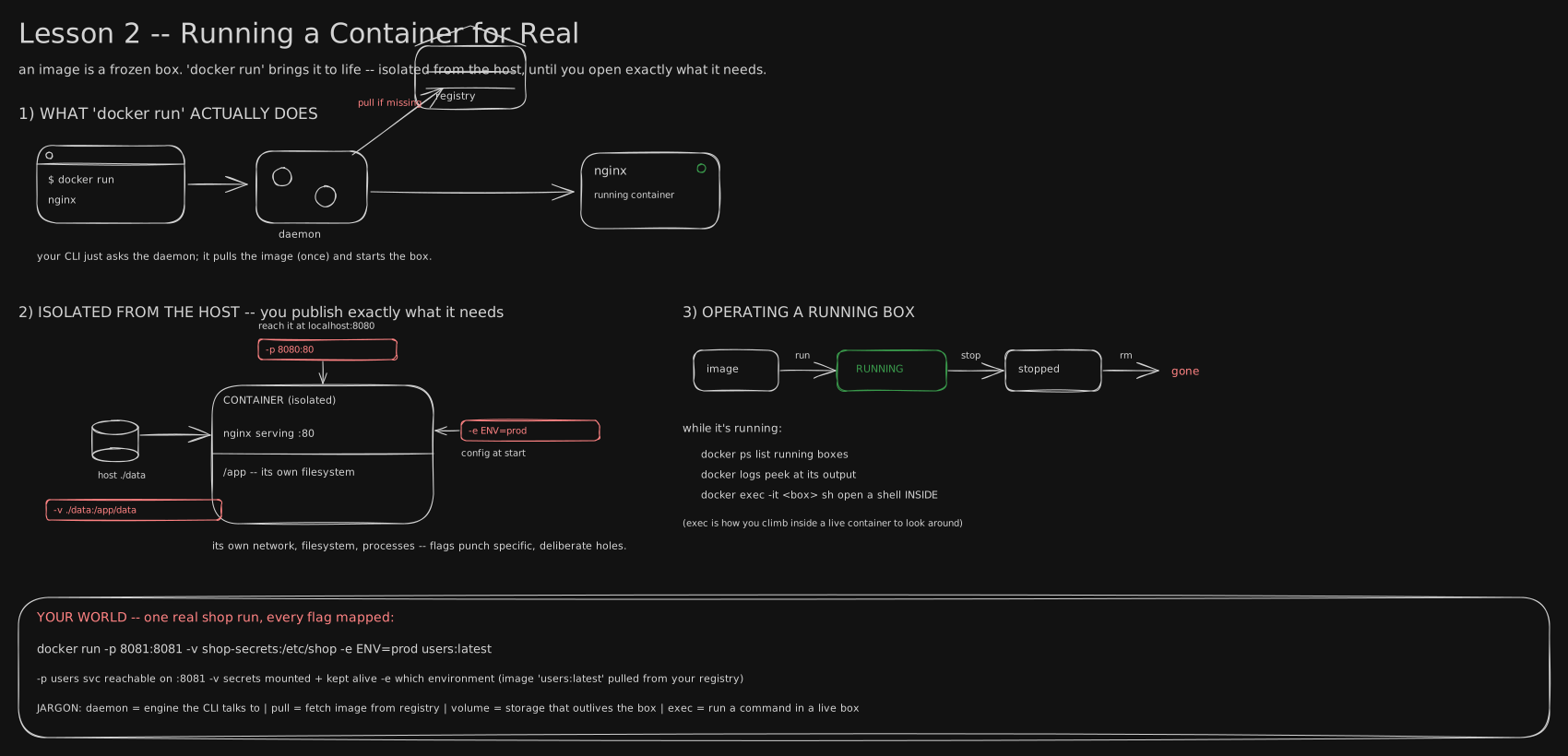
The command line: what docker run hands to the daemon, and the three holes you punch in an otherwise sealed box.
Before you start. Lesson 0016 sealed your app into an image - a frozen box on disk that does nothing alone - and introduced the daemon, the engine that pulls that box once and turns it into a running container. This lesson is what happens the moment someone switches it on as a process.
2006: the ration book Google had to invent
In 2002 the Linux kernel, the core of the operating system that hands out CPU, memory and files, got its first trick for a machine shared by many processes: let one process see its own private slice of the filesystem, invisible to everyone else. Al Viro’s patch landed in Linux 2.4.19, and its flag was just called “new namespace”, CLONE_NEWNS, because it was the first of its kind.
That fence solved seeing. It did nothing about using. Google’s shared clusters, thousands of jobs per machine, had the opposite problem: one runaway job could eat all the CPU or memory on a box and starve its neighbours. In 2006 two Google engineers, Paul Menage and Rohit Seth, patched the kernel: group processes together, then cap what each could draw. They called it “process containers.”
The name did not survive: “container” already meant full sealed-off environments like Solaris Zones and OpenVZ, and Menage’s patch only grouped processes and metered them. It was renamed control groups before it shipped, and merged into Linux 2.6.24 in January 2008 as the cgroup.
Docker wrapped both under one command in 2013. A namespace decides what a process can see. A cgroup decides how much it can use. “Isolated by default” is two kernel features, invented six years apart by different people, welded together by docker run.
Waking the box up
docker run is that weld. It hands the sealed image to the daemon, which pulls it once, drops a fresh process into a new set of namespaces, writes its limits into a fresh cgroup, and starts your program inside both: ordinary kernel mechanics any process rides on, see Processes, Threads & the Kernel. That running thing is the container. What is left is what fence and ration book actually buy you, and the three holes you punch on purpose: a port to let traffic in, a volume so data survives after the box is thrown away, and an environment variable to hand it a setting at start.
Five fences, and one that is missing
A namespace is not a metaphor for privacy. It is a real, separate view the kernel hands out per resource. The process gets its own list of running programs, numbered from 1 as if nothing else were running (its process table). It gets its own network plug, with its own address (its network interfaces). It gets its own set of folders, so the host’s files are not there (its mounted filesystem). Nothing is copied and nothing is emulated; the kernel just answers that process’s questions differently.
/proc/self/ns/ links to a number, the fence’s own id; two processes sharing a number share a fence. Start two containers and check:
=== container A ===          === container B ===          === the host's own PID 1 ===
pid   pid:[4026532498]       pid   pid:[4026532605]       pid   pid:[4026532275]
net   net:[4026532500]       net   net:[4026532607]       net   net:[4026532277]
mnt   mnt:[4026532495]       mnt   mnt:[4026532602]       mnt   mnt:[4026532272]
uts   uts:[4026532496]       uts   uts:[4026532603]       uts   uts:[4026532273]
ipc   ipc:[4026532497]       ipc   ipc:[4026532604]       ipc   ipc:[4026532274]
user  user:[4026531837]      user  user:[4026531837]      user  user:[4026531837]
Five rows differ, three ways, exactly as promised: mnt is its own folders, uts its own machine name, ipc its own channels for programs to talk to each other on the same machine. The sixth does not differ anywhere. Docker does not build a user namespace by default, so root inside a container is uid 0 on the host, the same uid 0. What stops that root from owning the machine is not a different identity: the daemon strips most of root’s powers (its capabilities) first. That fence has a hole on purpose, thinner than “isolated” sounds, the whole subject of VM vs Kubernetes, and what a cluster actually is.
One process wearing two numbers
There is no wall to climb into a container; it never left the host. It is an ordinary process wearing two badges:
# inside the container                # the same process, from the host
$ grep -E 'Name|Pid|NSpid' /proc/1/status
Name:  sleep                          Name:  sleep
Pid:   1                              Pid:   2312
NSpid: 1                              NSpid: 2312   1
NSpid: 2312 1 is one process, two numbers: 2312 to the host, 1 inside its own fence. ps on the host lists it beside every other process; kill from the host ends it. docker exec is the same trick from outside: a new process handed the container’s same namespace numbers, so an exec shell sees the container’s files and ports, and leaving it stops nothing. You left. PID 1 did not.
The ration book, and the arithmetic
The fence is free. The ration book is what you set. docker run -m 64m --cpus 0.5 never talks to the container; it writes two numbers into the kernel’s cgroup, and the container reads its own limits straight back:
$ docker run --rm -m 64m --cpus 0.5 alpine:3.20 sh -c \
    'cat /sys/fs/cgroup/memory.max; cat /sys/fs/cgroup/cpu.max'
67108864
50000 100000
67108864 is 64 × 1024 × 1024: your 64 MB, in bytes. 50000 100000 is quota and period in microseconds - 50000 ÷ 100000 = 0.5 CPUs, re-checked every tenth of a second. Leave both flags off and the ration book reads max: no limit, no complaint until the machine falls over.
Crossing the CPU line slows you down; the scheduler waits for the next window. Crossing the memory line is a killing:
$ docker run -m 64m alpine:3.20 sh -c 'dd if=/dev/zero of=/dev/shm/fill bs=1M count=200'
Killed
$ docker inspect <that container> --format 'OOMKilled={{.State.OOMKilled}} ExitCode={{.State.ExitCode}}'
OOMKilled=true ExitCode=137
137 is arithmetic, not a mystery: a process killed by signal n exits with 128 + n, and SIGKILL is signal 9 - 128 + 9 = 137. Any 137 means something SIGKILLed the process, and OOMKilled=true names the something. It is the most common exit code in container work, and almost never a bug in your own code.
Why the box forgets, and the pipe that does not
The container’s own filesystem is not a disk; it is a thin writable sheet on top of the image’s read-only layers, and that sheet belongs to the container, not the image. docker rm deletes it with the container: write a file, remove the box, run a fresh one from the same image, and the file is gone; it was never in the image.
A volume steps outside that lifecycle: a host directory plugged into the container’s filesystem view rather than stored inside it. A container writes to it, dies, and a brand-new container reading the same volume finds the file where it was left: it was never inside a container at all. -v ./data:/app/data, a path, pins one host folder, a bind mount, good for your own source code. -v uploads:/app/data, a bare name, is a named volume Docker manages itself, the one you want for anything that has to outlive a laptop.
Ten seconds you didn’t ask for
docker stop is polite before it is final: it sends the process a SIGTERM, waits a grace period - ten seconds by default - then sends SIGKILL, which cannot be caught or ignored. Which half you get depends on the process wearing the badge marked PID 1: the kernel does not apply a default action to a signal PID 1 never explicitly handles. nginx handles SIGTERM and exits in a fifth of a second. A bare shell script, or a shell that merely launches your app, has no handler: it ignores the SIGTERM, sits through the grace period, and is killed mid-request:
sequenceDiagram
    participant D as docker stop
    participant P as PID 1
    D->>P: SIGTERM
    Note over P: nginx handles it, exits in 0.2 s
    Note over P: a bare shell ignores it
    D->>P: wait the grace period, 10 s
    D->>P: SIGKILL
    Note over P: dies mid-request, 10.2 s after the stop began
Fifty times slower for doing nothing wrong, and it multiplies: a rolling update (Self-Healing & Autoscaling) stopping sixty pods in turn costs 60 × 0.2 = 12 seconds when PID 1 handles the signal, and 60 × 10.2 ≈ 612 seconds - over ten minutes - when it does not, each pod dying mid-request. The fix costs one line: run your app as PID 1 with the exec form of CMD (CMD ["python","app.py"], not CMD python app.py, which hands PID 1 to a shell), or add docker run --init for a tiny signal-forwarding process.
Two refinements, both measured in Linux and the Shell: Processes, Files, Pipes, Permissions and Signals. The shell form is not always a trap: Alpine’s shell skips the extra process when the command is one plain program, so the app can end up as PID 1 anyway, and only a real shell script or a pipe keeps the shell in front. And --init makes the stop fast without always letting the app tidy up: tini passes SIGTERM to its one child, so if that child is a wrapper shell, the shell dies and the app behind it never runs its cleanup. Ending the wrapper script with exec is the fix that reaches the app itself.
You now know
- A container is a sealed image switched on: a process dropped into a fresh fence (namespace) with a fresh ration book (cgroup).
- The fence decides what it can see, and one fence, the user namespace, is missing by default: root inside is root on the host.
- The ration book decides what it can use. Cross the CPU line and you wait; cross the memory line and you die, exit code 137.
- The container’s own filesystem dies with it. A volume is the one thing built to outlive that.
docker stopasks nicely for ten seconds. Only the process wearing PID 1 gets to answer, and most shells never do.
Stop here if you want. What follows is the same box, with every remaining number and command.
Second read: the exec trick, -p, the writable layer, and the daemon underneath
docker exec uses the same namespace-joining trick, just from outside: it starts a new process and puts it in the container’s existing namespaces.
container PID 1 net ns : net:[4026534051]
this exec-ed shell     : net:[4026534051]      <- same number: same view
Same number, same view: why an exec shell sees the container’s files and ports. Every namespace number, address and size in this section is one run on one local Docker machine, not a fixed value; yours will differ, and only the relationships between them carry over.
-p is address translation, not a hole in a wall. The container has its own network namespace, so it has its own IP and listens on :80 inside that namespace, knowing nothing about any host port:
$ docker run -d --name porty -p 8099:80 nginx:alpine
$ docker port porty
80/tcp -> 0.0.0.0:8099
$ docker inspect porty --format '{{range .NetworkSettings.Networks}}{{.IPAddress}}{{end}}'
192.168.215.5
$ docker exec porty netstat -ltn
tcp   0   0   0.0.0.0:80   0.0.0.0:*   LISTEN
Nothing inside the container mentions 8099. The container has its own private address inside the machine; the -p flag tells the host to pass anything that knocks on its door 8099 through to the container’s door 80. -p 8099:80 is a rule on the host: rewrite packets arriving at host port 8099 to 192.168.215.5:80 and forward them - the same trick a home router’s port forward uses (One address, a thousand doors), which is why the failure modes rhyme: a host port already in use refuses at start, and a container that binds 127.0.0.1 inside itself is unreachable no matter how the flag is written, because the rule delivers to the container’s real address and nothing is listening there. Read the flag as host:container - -p 80:8080 is a real typo, and nothing errors; the port just never answers.
-p also controls ingress from the host only, not from other containers.
$ docker run -d --name iso-b nginx:alpine        # no -p, no published port at all
$ docker port iso-b                              # (prints nothing)
$ docker inspect iso-b --format '{{range .NetworkSettings.Networks}}{{.IPAddress}}{{end}}'
192.168.215.5
$ docker exec iso-a wget -qO- http://192.168.215.5/     # an unrelated container
<!DOCTYPE html>
Every container on the same Docker network reaches every other one, on every port, with no flags at all. “We didn’t publish the port” is not a security boundary between containers - the same fact returns one layer up as “pods are closed by default” in Pods, ReplicaSets & Deployments (the ownership chain). (Name resolution belongs to the network: on the default bridge, getent hosts iso-b finds nothing; names resolve only on a user-defined network, which is what compose builds for you - Many at Once (compose & networking).)
The writable sheet, measured.
$ docker exec ns-a mount | grep 'on / '
overlay on / type overlay (rw,relatime,lowerdir=/var/lib/docker/overlay2/l/D2R2GM6…
Write 12 MB and watch the split:
$ docker exec ns-a dd if=/dev/zero of=/big bs=1M count=12
$ docker ps -s --filter name=ns-a
ns-a   SIZE=12.8MB (virtual 21.6MB)
12.8 MB is the writable sheet; 21.6 − 12.8 = 8.8 MB is the shared alpine image underneath, the same bytes every other alpine container is reading. And the volume claim, exactly as the story described it:
$ docker run --name vol-none alpine:3.20 sh -c 'echo "an upload" > /data.txt; cat /data.txt'
an upload
$ docker rm vol-none && docker run --rm alpine:3.20 cat /data.txt
cat: can't open '/data.txt': No such file or directory
$ docker volume create chalk-uploads
$ docker run --rm -v chalk-uploads:/data alpine:3.20 sh -c 'echo "an upload" > /data/file.txt'
$ docker run --rm -v chalk-uploads:/data alpine:3.20 cat /data/file.txt
an upload
$ docker volume inspect chalk-uploads --format '{{.Mountpoint}}'
/var/lib/docker/volumes/chalk-uploads/_dataWorth saying plainly: docker rm deletes a container’s data; docker volume rm deletes a volume’s - only the second one is meant to.
-e is config, not a secret. An environment variable is readable by anyone who can run docker inspect, it is copied into every child process, and it lands in /proc/<pid>/environ:
$ docker run -d --name envy -e DB_PASSWORD=hunter2 alpine:3.20 sleep 60
$ docker inspect envy --format '{{range .Config.Env}}{{println .}}{{end}}' | grep DB_
DB_PASSWORD=hunter2
$ docker exec envy sh -c 'tr "\0" "\n" < /proc/1/environ' | grep DB_
DB_PASSWORD=hunter2
Most crash reporters and debug endpoints happily print the whole environment; a file mounted with restrictive permissions has none of those properties. Config, Secrets & Storage makes the identical argument about Kubernetes Secrets, because it is a property of environment variables, not of whichever orchestrator holds them.
Who actually does the work. docker, the CLI, only sends an HTTP request over a Unix socket, which is why the same CLI can drive a daemon on another machine entirely. The daemon delegates to containerd, a long-lived supervisor, which starts runc for each container: a small program that creates the namespaces, writes the cgroup files, drops the capabilities, execs your process, then exits:
flowchart LR
    A[docker CLI] -->|HTTP over a socket| B[dockerd, the daemon]
    B -->|delegates| C[containerd]
    C -->|starts, per container| D[runc]
    D -->|creates namespaces, cgroups, then exits| E[your process, PID 1]
Only runc is privileged, and it is gone by the time your process is running - why a container survives a daemon restart (nothing in that chain is its parent any more), and why an error mentioning runc or containerd means the failure happened below Docker, down where the kernel is actually being talked to.
Operating a live box
docker ps                     # what's running
docker logs <box>             # peek at its output
docker exec -it <box> sh      # open a shell INSIDE a running container
docker stop <box> ; docker rm <box>
Lifecycle: image → run → RUNNING → stop → stopped → rm → gone.
Try it (5 min, if Docker’s installed)
docker run -d -p 8080:80 --name web nginx     # detached, port published
open http://localhost:8080                      # nginx welcome page
docker exec -it web sh                          # look inside
docker logs web ; docker stop web ; docker rm web
Try it - look at the machinery, not the app (10 min)
Everything printed above came from these. Nothing here needs a cluster or a cloud.
# 1. The six views. Run two at once and compare; note which row does NOT differ.
docker run -d --name a alpine:3.20 sleep 300
docker run -d --name b alpine:3.20 sleep 300
for c in a b; do echo "== $c"; docker exec $c sh -c \
  'for n in pid net mnt uts ipc user; do printf "%-5s %s\n" $n "$(readlink /proc/self/ns/$n)"; done'; done

# 2. One process, two PIDs. NSpid prints both.
docker exec a grep -E 'Name|Pid|NSpid' /proc/1/status
docker run --rm --pid=host --privileged alpine:3.20 sh -c \
  'grep -lE "^Name:.*sleep" /proc/[0-9]*/status | head -3 | xargs grep -H NSpid'

# 3. The limits, as the kernel stored them. Do the arithmetic yourself.
docker run --rm -m 64m --cpus 0.5 alpine:3.20 sh -c \
  'cat /sys/fs/cgroup/memory.max /sys/fs/cgroup/cpu.max'

# 4. Cross the memory line on purpose and read the exit code.
docker run --name oom -m 64m alpine:3.20 sh -c 'dd if=/dev/zero of=/dev/shm/f bs=1M count=200'
docker inspect oom --format 'OOMKilled={{.State.OOMKilled}} ExitCode={{.State.ExitCode}}'

# 5. The 10-second stop. Time both.
docker run -d --name slow  alpine:3.20 sh -c 'while true; do sleep 1; done'
docker run -d --name quick nginx:alpine
time docker stop slow ; time docker stop quick

# 6. -p is not a wall. Reach an unpublished container from another container.
docker run -d --name target nginx:alpine            # no -p at all
docker exec a wget -qO- "http://$(docker inspect target \
  --format '{{range .NetworkSettings.Networks}}{{.IPAddress}}{{end}}')/" | head -1

# clean up everything this created
docker rm -f a b oom slow quick target ; docker volume rm chalk-uploads 2>/dev/null
Go deeper
- docker run reference
- volumes
- Namespaces, one page per kind:
man 7 namespaces - What cgroup v2 files mean, including
memory.maxandcpu.max: cgroup v2 documentation - The runtime
runcimplements: OCI runtime spec
Related
- The box, before you run it: The Shipping Container (Docker)
- Building your own, secrets kept out: The Recipe (the Dockerfile)
- Several containers, one network, names not IPs: Many at Once (compose & networking)
- The same isolation question, asked seriously: VM vs Kubernetes, and what a cluster actually is
- Processes, the kernel, what a namespace is underneath: Processes, Threads & the Kernel
- Port forwarding, one layer down: One address, a thousand doors
- Where the ten-second stop starts costing money: Self-Healing & Autoscaling
- Full track order: CURRICULUM
Retrieval practice
9 questions. Answer each one before you open it.
You docker run a web app but your browser can’t reach it. What did you forget to punch through the fence?
The -p port publish. The container has its own network namespace; without a published port, whatever it’s listening on is invisible from the host. Add -p 8080:80.
A container writes user uploads to /app/data. You redeploy (a brand-new container) and the uploads are gone. Why, and the fix?
The writable layer belongs to that one container and dies with docker rm. Mount -v uploads:/app/data - a volume lives outside the container’s lifecycle entirely.
What’s the difference between the docker CLI and the daemon?
The CLI only sends a request over a socket, no special power of its own; the daemon is the long-running engine that pulls images, creates the namespaces and cgroups, and runs containers. Same split whether the daemon is on your laptop or a server.
A running container is misbehaving. How do you look inside without killing it?
docker exec -it <box> sh - it starts a new process and joins it to the container’s existing namespaces, so it sees the same filesystem and ports. docker logs shows output from outside; exec lets you poke around live.
Map every flag: docker run -p 8081:8081 -v shop-secrets:/etc/shop -e ENV=prod users:latest
-p publishes port 8081; -v mounts a volume so the secrets survive restarts; -e sets a config value at start; users:latest is the image pulled. The daemon assembles all of it into one running container inside a fresh namespace and cgroup.
A container exits with code 137 and nothing useful in the logs. What does 137 mean arithmetically, what almost always caused it, and which field confirms it?
A process killed by signal n exits with 128 + n; SIGKILL is signal 9, so 128 + 9 = 137 - something SIGKILLed it. Usually the memory cgroup: the process crossed memory.max and the OOM killer ended it, since memory has no throttling, only killing. Confirm with docker inspect <c> --format '{{.State.OOMKilled}}'; true settles it, and the fix is a bigger -m or a smaller working set.
Five of a container’s six namespaces differ from the host’s; one is identical. Which one, and what does that mean for a process running as root inside the container?
The user namespace - Docker does not create one by default, so uid 0 inside is uid 0 on the host, the same id. Root inside is not a different, sandboxed root; what limits it is that the daemon drops most of root’s capabilities and applies a seccomp filter, a real barrier but thinner than “isolated” suggests.
docker run -m 64m --cpus 0.5 produces memory.max = 67108864 and cpu.max = 50000 100000. Derive both numbers, and say which limit throttles and which one kills.
67,108,864 = 64 × 1024 × 1024, the memory ceiling in bytes. 50000 100000 is quota and period in microseconds: 50,000 ÷ 100,000 = 0.5 CPUs, a ceiling re-enforced every 100 ms. CPU throttles - the process is descheduled until the next window and just runs slower. Memory kills - there is no “run with less,” so crossing the line means the OOM killer and exit 137.
Two containers are stopped: one takes 0.2s, the other 10.2s, and nothing is broken. Explain, and give the fix.
docker stop sends SIGTERM, waits a grace period (10s default), then SIGKILL. The kernel applies no default action to PID 1, so a process running as PID 1 with no SIGTERM handler - a bare shell loop, or CMD python app.py where a shell becomes PID 1 and forwards nothing - ignores the signal, sits through the whole grace period, then dies mid-request. Fix: run the app as PID 1 with the exec form (CMD ["python","app.py"]), or add docker run --init for a tiny signal-forwarding process.