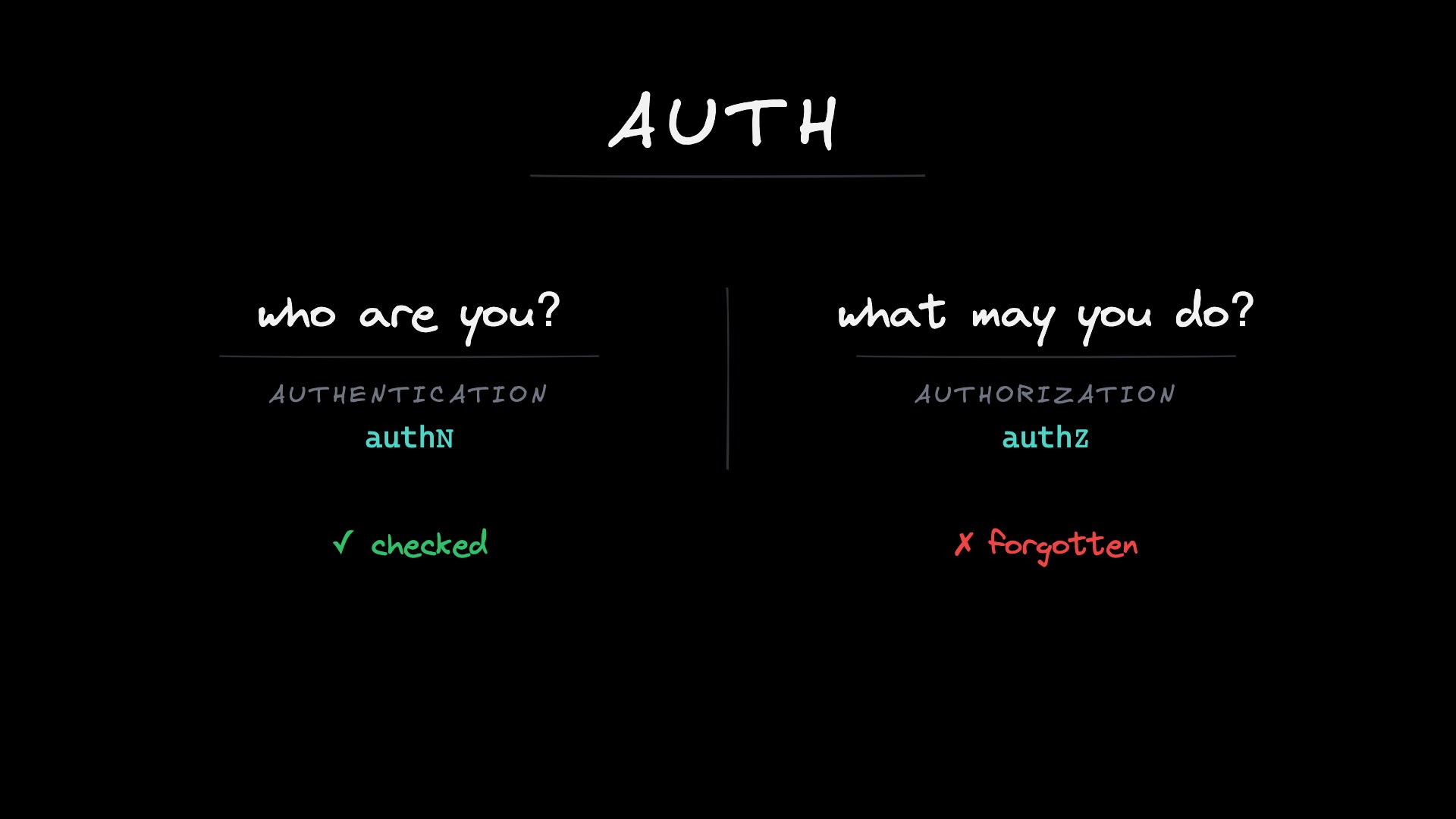
Authentication
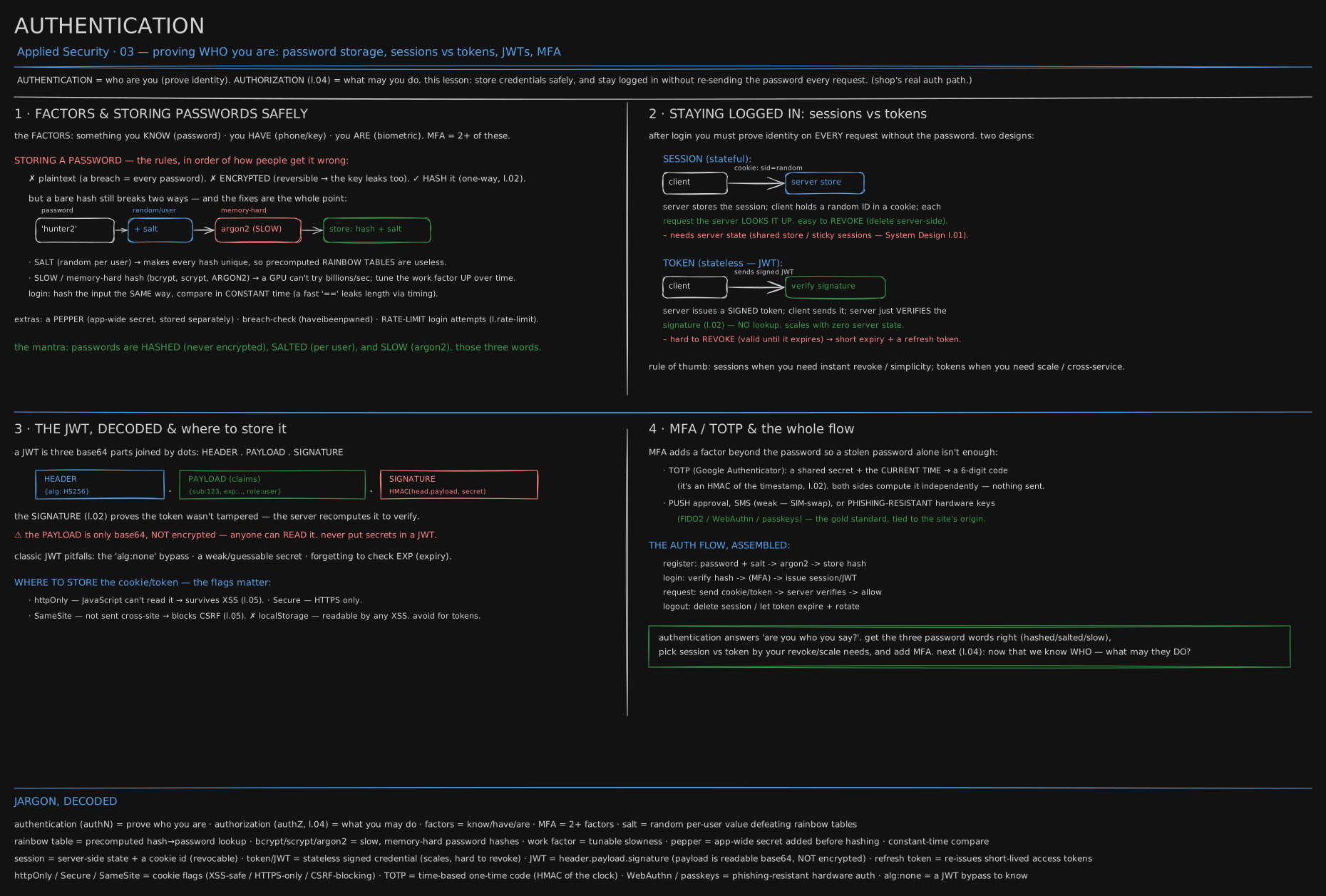
One real login, drawn end to end: how a password is stored so a stolen database is useless on its own, and how a browser stays logged in afterward without resending it. It puts the hash and the HMAC from Cryptography Foundations to work.
Before you start. Cryptography Foundations gave you two tools this lesson spends. A hash scrambles anything into a fixed-length string with no way back to the original. An HMAC is a hash mixed with a secret key, so only whoever holds that key could have produced it. Nothing else is assumed.
Think of one building with one door. Everyone who works there set a PIN on their first day, to prove at the door they are who they say. What the building does with that PIN, and what it hands you afterward so you don’t retype it at every elevator, is this lesson.
December 2009: 32 million passwords, sitting in plain text
RockYou ran a popular social-media add-on. In December 2009 an attacker used a ten-year-old, unpatched SQL flaw in its code to read the entire user table straight out of the database. There was nothing to crack: RockYou had filed every password as ordinary text, the exact letters the user typed, next to that person’s email. Over 32 million accounts came out in one list, and the list is still used today to guess passwords on other sites, because so many people reuse the same one everywhere.
The bug was not the real failure. Bugs happen; a building’s lock gets picked sometimes. The real failure was that one bug anywhere in the system handed over every PIN in the building, in a form anyone could read on sight.
1978: the fix that was already thirty years old
The fix had been published thirty years before RockYou needed it. In 1978, two Bell Laboratories researchers, Robert Morris and Ken Thompson, wrote up how Unix stored passwords, and the two ideas in that paper are still what a login does today.
First idea: never file the PIN itself. Run it through a one-way scrambler before it touches storage, so the file holds the scramble, not the word. Feed in “hunter2” and it comes out as static, the same static every time, but no calculation turns static back into “hunter2”. That scrambler is a hash, and a login is checked by hashing what was just typed and comparing the two pieces of static, never the two words.
Second idea: two people with the same PIN should not file the same static, or cracking one gets both accounts free, and a chart of pre-cracked static built once works on every account at once. The fix mixes in a few random characters, different per person, before hashing: “hunter2” for one employee and “hunter2” for another now come out different. That random ingredient is a salt, filed right alongside the hash, in plain view, so the check can redo the same mixing next time.
flowchart LR
  P["PIN: hunter2"] --> M["mixed with a random salt, per person"]
  M --> H["one-way hash"]
  H --> D["filed: salt + static, never the word"]
A careful signup does exactly this: read the salt and the static out of a stolen database, and neither tells you the PIN.
There is a third piece RockYou’s bug alone would not have needed: make the hash slow, on purpose. An ordinary hash is fast, which is exactly wrong here, since fast means a thief who steals the file can try billions of guesses a second. A password hash spends real time instead, so that cost lands once on the defender’s login rather than billions of times on the attacker’s guesses. How much time, and what it buys, is worth seeing in numbers, in the second half.
Staying inside: a logbook kept, or a badge that checks itself
Checking the PIN once solves only half the problem. After the door, every elevator would otherwise need the PIN retyped, which nobody would tolerate. Something has to carry “already checked” forward, and there are exactly two ways to build it.
The front desk can keep a logbook: “badge 42, signed in at 9am.” It hands the employee only a random badge number, and every reader calls down to the desk with that number to look the entry up. Engineers call the kept entry a session, and the number rides on a small tag the badge flashes at every reader, called a cookie. Logging out just means the desk crosses the entry out; the number the badge still carries stops meaning anything, instantly.
Or the front desk can skip the logbook and hand out a badge already stamped: “employee 42, valid until Tuesday,” in ink only security’s own machine can produce. Any reader can check the stamp on the spot, no call to the desk needed. Engineers call that self-checking badge a token. Nothing is stored or looked up; the badge proves itself. The price: crossing someone out early does nothing, since the badge keeps proving itself right up to the date stamped on it.
The badge, edited
A stamped badge is only as good as the stamp. The site hands out a badge reading “employee 42, ordinary user,” stamped by a machine only the site owns. Anyone holding it can read every word in plain sight, so someone scratches out “ordinary,” writes in “admin,” and keeps the same stamp.
A reader does not trust the words. It re-runs the site’s own stamping recipe over the edited text and compares the result to the stamp already there. The recipe used the same secret key both times, so if even one letter changed, the two stamps no longer match, and the reader throws the badge out before it looks at what it claims. Here the analogy runs out of road: a forged physical stamp is ink and a steady hand, something a patient forger could eventually fake. Reproducing this stamp without the secret key means guessing one exact number out of more possibilities than there are atoms in the visible universe.
You now know
- A password stored so a thief could read it back is a catastrophe waiting for one bug: the app maker RockYou lost 32 million passwords that way in 2009.
- A hash turns a password into a one-way scramble; storage keeps only the scramble, never the word.
- A salt is a random extra mixed in per person before hashing, so identical passwords don’t produce identical, or cheaply pre-cracked, scrambles.
- Staying logged in is either a session, an entry the server keeps and looks up, or a token, a note the server stamps once and never has to look up again.
- A token’s stamp is what makes an edited copy fail: change one word and the recomputed stamp stops matching.
Stop here if you want. What follows is the same login in numbers, and the same token forged in real code so you can watch the forgery fail.
Second read: how slow is slow, and the forgery in code
Slow, measured
“Slow” has a dial. bcrypt’s cost is the log of how many times it iterates: cost 10 is 2^10 rounds, and every +1 doubles the time. One core, one hash at each cost, and what that does to an attacker who has stolen the hashes and is guessing offline:
// bcrypt-cost.mjs  -  node bcrypt-cost.mjs   (npm i bcryptjs)
// How long one bcrypt hash takes at each cost, and what that does to a guesser.
import bcrypt from "bcryptjs";
bcrypt.hashSync("warm up", 6);                                   // first call pays JIT cost; not part of the table
console.log("cost   one hash     guesses/sec (this CPU, one core)   1e9 guesses take");
for (const cost of [4, 8, 10, 12, 14]) {
  const t0 = performance.now();
  bcrypt.hashSync("correct horse battery staple", cost);
  const ms = performance.now() - t0;
  const gps = 1000 / ms;
  console.log(String(cost).padStart(4) + "   " + ms.toFixed(1).padStart(7) + " ms   " + gps.toFixed(0).padStart(10) + "                        " + (1e9 / gps / 86400).toFixed(0) + " days");
}
const t0 = performance.now(); for (let i = 0; i < 100000; i++) (await import("node:crypto")).createHash("sha256").update("correct horse battery staple" + i).digest();
console.log("sha256, for comparison:", ((performance.now() - t0) / 100000).toFixed(4), "ms per hash (and a GPU does ~10,000x this)");
cost one hash guesses/sec (this CPU, one core) 1e9 guesses take
4 1.0 ms 1036 11 days
8 12.2 ms 82 142 days
10 50.1 ms 20 580 days
12 205.0 ms 5 2373 days
14 834.2 ms 1 9655 days
sha256, for comparison: 0.0016 ms per hash (and a GPU does ~10,000x this)Read the two ends. SHA-256 takes 1.6 microseconds here, so a single core tries about 625,000 guesses a second (1 ÷ 0.0000016) and a GPU rig several billion: a leaked SHA-256 table falls in hours (36⁸ = 2.8 × 10¹² 8-character lowercase-plus-digit passwords, cleared by a 10-billion-a-second rig in 2.8×10¹² ÷ 10¹⁰ = 280 s, since with no salt one guess tests every user at once). bcrypt at cost 12 takes 205 ms - 205 ÷ 0.0016 = 128,000 times slower per guess - so a billion guesses is six and a half years on one core. The defender pays 205 ms once per login, unnoticed; the attacker pays it once per guess, which is the whole design. Pick a cost near a quarter second on your server and raise it every couple of years: the hash string records its own cost, so old hashes still verify and are re-hashed at the new cost next login.
Credential stuffing, as arithmetic
The other attack does not need your hashes at all. Credential stuffing is taking a list of email and password pairs leaked from another site and trying each one against yours, on the bet that people reuse passwords. Suppose a million pairs and a 1-in-100 reuse rate:
// stuffing.mjs  -  node stuffing.mjs
// Credential stuffing arithmetic. A leaked list of 1,000,000 email:password pairs from another site;
// about 1 in 100 people reused the same password here. How long to find them all, under each defence?
const pairs = 1_000_000, reuse = 0.01;
const valid = pairs * reuse;
console.log(`valid logins hiding in the list: ${valid}`);
const rows = [
  ["no limit, 500 req/s from one box", 500],
  ["10 attempts per minute per IP, attacker has 1 IP", 10 / 60],
  ["10 attempts per minute per IP, attacker rents 10,000 IPs", 10 / 60 * 10000],
  ["5 failures then a 15-minute lock per ACCOUNT, 10,000 IPs", null],
];
for (const [label, rps] of rows) {
  if (rps === null) { console.log(label.padEnd(58), "-> each account allows 5 tries per 15 min; the list is 1 try per account, so the lock never fires. Per-account locks do not stop stuffing."); continue; }
  const secs = pairs / rps;
  console.log(label.padEnd(58), "->", (secs / 3600).toFixed(1).padStart(8), "hours to try the whole list");
}
console.log("\nwith MFA on every account: " + valid + " correct passwords, 0 logins. The list is worth nothing.");
valid logins hiding in the list: 10000
no limit, 500 req/s from one box -> 0.6 hours to try the whole list
10 attempts per minute per IP, attacker has 1 IP -> 1666.7 hours to try the whole list
10 attempts per minute per IP, attacker rents 10,000 IPs -> 0.2 hours to try the whole list
5 failures then a 15-minute lock per ACCOUNT, 10,000 IPs -> each account allows 5 tries per 15 min; the list is 1 try per account, so the lock never fires. Per-account locks do not stop stuffing.
with MFA on every account: 10000 correct passwords, 0 logins. The list is worth nothing.The last three lines matter most. A per-IP limit looks strong (1,000,000 ÷ 10 = 100,000 minutes, ten weeks), but the attacker rents ten thousand addresses and the list clears in ten minutes instead, for a few dollars an hour. A per-account lockout does nothing here: stuffing tries each account once, so a lock that fires on the fifth failure never fires, and it hands an attacker a way to lock real users out on purpose. Only MFA ends it: ten thousand correct passwords, zero logins, and the list is worth nothing to sell.
Sessions and tokens, side by side
The logbook and the self-stamped badge, from login to the first later request to logout:
sequenceDiagram
  participant B as browser
  participant S as server
  participant ST as session store
  Note over B,ST: session cookie
  B->>S: POST /login (password)
  S->>S: argon2 verify
  S->>ST: create session abc123 for user 42
  S-->>B: Set-Cookie sid=abc123, HttpOnly, Secure, SameSite
  B->>S: GET /orders  Cookie: sid=abc123
  S->>ST: look up abc123
  ST-->>S: user 42
  S-->>B: 200 orders
  B->>S: POST /logout
  S->>ST: delete abc123 (revoked this instant)
  Note over B,ST: JWT
  B->>S: POST /login (password)
  S->>S: argon2 verify, sign {sub 42, exp} with the secret
  S-->>B: token header.payload.signature
  B->>S: GET /orders  Authorization: Bearer token
  S->>S: recompute the signature, check exp (no lookup)
  S-->>B: 200 orders
  B->>S: POST /logout
  Note over S: nothing to delete: the token is valid until exp
Two things to spot. First, the session half has arrows to the session store and the token half has none, which is why tokens scale more easily. Second, look at the two logouts: the session logout deletes a row and the login is dead everywhere at once, while the token logout has nothing to delete, which is why sessions are easier to revoke.
The JWT, decoded, and where to store it
The self-stamped badge has a real name: a JWT, three base64url parts joined by dots, HEADER . PAYLOAD . SIGNATURE.
- Header: the algorithm, e.g.
{"alg":"HS256"}. - Payload: the claims -
sub(user id),exp(expiry), roles, etc. - Signature:
HMAC(header.payload, secret)(or an RS256 signature) - proves the token wasn’t tampered with; the server recomputes it to verify.
⚠ The payload is only base64, not encrypted - anyone can read it, which is how the edited badge got its new claim read at all. Never put secrets in a JWT. Pitfalls: the alg:none bypass (a forged token claiming “no signature”), a weak or guessable HMAC secret, and forgetting to check exp. Where the browser stores the cookie or token matters too:
- httpOnly - JavaScript can’t read it → survives XSS (Web Vulnerabilities (the OWASP classics)).
- Secure - only sent over HTTPS.
- SameSite - not sent on cross-site requests → blocks CSRF (Web Vulnerabilities (the OWASP classics)).
- ✗ localStorage - readable by any XSS; avoid it for tokens.
The forgery from the story, in real code
HS256 is nothing but the HMAC from Cryptography Foundations over two base64url strings. Here is one issued, read without the key, and then forged by editing the role, with a throwaway secret generated for the run:
// jwt.mjs  -  node jwt.mjs
// A JWT by hand: HS256 = HMAC-SHA256 over base64url(header).base64url(payload). Then tamper with it.
import { createHmac, randomBytes, timingSafeEqual } from "node:crypto";
const b64 = (o) => Buffer.from(JSON.stringify(o)).toString("base64url");
const secret = randomBytes(32);                                  // thrown away after this run
const sign = (h, p) => { const body = `${b64(h)}.${b64(p)}`; return `${body}.${createHmac("sha256", secret).update(body).digest("base64url")}`; };
const verify = (t) => {
  const [h, p, s] = t.split(".");
  const expect = createHmac("sha256", secret).update(`${h}.${p}`).digest("base64url");
  if (s.length !== expect.length || !timingSafeEqual(Buffer.from(s), Buffer.from(expect))) return "BAD SIGNATURE";
  const claims = JSON.parse(Buffer.from(p, "base64url"));
  if (claims.exp < Math.floor(Date.now() / 1000)) return "EXPIRED";
  return claims;
};
const token = sign({ alg: "HS256", typ: "JWT" }, { sub: "user-42", role: "user", exp: 1800000000 });
console.log("token:", token);
console.log("payload, decoded with no key at all:", JSON.parse(Buffer.from(token.split(".")[1], "base64url")));
console.log("verify(token)          =", verify(token));
const [h, , s] = token.split(".");
const forged = `${h}.${b64({ sub: "user-42", role: "admin", exp: 1800000000 })}.${s}`;
console.log("verify(role -> admin)  =", verify(forged));
console.log("verify(expired)        =", verify(sign({ alg: "HS256" }, { sub: "user-42", exp: 1700000000 })));
token: eyJhbGciOiJIUzI1NiIsInR5cCI6IkpXVCJ9.eyJzdWIiOiJ1c2VyLTQyIiwicm9sZSI6InVzZXIiLCJleHAiOjE4MDAwMDAwMDB9.NW8CnEPsTM1T97ZpY8PLgItdxMMREnCx9xj7aaCJgWo
payload, decoded with no key at all: { sub: 'user-42', role: 'user', exp: 1800000000 }
verify(token) = { sub: 'user-42', role: 'user', exp: 1800000000 }
verify(role -> admin) = BAD SIGNATURE
verify(expired) = EXPIREDThe second line demonstrates the warning above: the payload came back from Buffer.from(p, "base64url") alone, no key needed. The fourth line is the story’s forged badge, in code: same header and signature, one word changed, and the recomputed HMAC no longer matches. This verifier compares with timingSafeEqual, not a leaky === (the reason signatures and passwords alike are compared in constant time), checks exp only after the signature passes, and never reads the algorithm off the attacker-controlled header, closing the alg: none bypass in one line.
MFA / TOTP, and the whole flow
MFA adds a factor so a stolen password alone isn’t enough:
- TOTP (Google Authenticator): a shared secret plus the current time produces a 6-digit code, an HMAC of the timestamp. Both sides compute it independently - nothing is transmitted.
- Push approval or SMS is weaker (SIM-swap risk); phishing-resistant hardware keys (FIDO2 / WebAuthn / passkeys) are the gold standard, bound to the site’s origin so a phishing page can’t relay them.
The auth flow assembled:
register:  password + salt → argon2 → store hash
login:     verify hash → (MFA) → issue session / JWT
request:   send cookie/token → server verifies → allow
logout:    delete session / let token expire + rotate
Try it
import argon2, secrets                    # pip install argon2-cffi
ph = argon2.PasswordHasher()
h = ph.hash("hunter2")                     # salt + work factor baked into the string
print(h)                                   # $argon2id$v=19$m=...,t=...,p=...$salt$hash
print(ph.verify(h, "hunter2"))             # True
try: ph.verify(h, "wrong")
except argon2.exceptions.VerifyMismatchError: print("rejected")

# decode (NOT verify) a JWT payload to see it's just base64 - readable!
import base64, json
payload = "eyJzdWIiOiIxMjMiLCJyb2xlIjoidXNlciJ9"
print(json.loads(base64.urlsafe_b64decode(payload + "==")))   # {'sub':'123','role':'user'}
With node and the three scripts above, five minutes:
node bcrypt-cost.mjs: find the cost closest to 250 ms on your machine. That’s your production setting today; write down the date, because it’s wrong in two years.node jwt.mjs, then swaptimingSafeEqual(...)fors === expect: it still saysBAD SIGNATURE, so the timing leak is invisible to a single run, which is why it survives code review.node stuffing.mjswithreuse = 0.001: a thousand valid logins in the list, still zero with MFA.- Paste the token from
jwt.mjsinto jwt.io: it decodes both halves without the secret.
Go deeper
- OWASP - Password Storage Cheat Sheet & Session Management Cheat Sheet
- jwt.io (decode a token live)
- WebAuthn / passkeys guide
- Argon2 (the password-hashing competition winner)
- RockYou (2009 breach)
- Salt (cryptography), on Morris and Thompson’s 1978 paper.
Related
- Cryptography Foundations - the hash, the HMAC and the signature the JWT is made of, run on their own.
- Authorization & Identity - what a logged-in user may do; the check this lesson’s token feeds into.
- Web Vulnerabilities (the OWASP classics) - XSS and CSRF, the two attacks the cookie flags exist for.
- The chai stall that got famous (load balancing) - why a session store is the thing that stops a server being copied, from the system-design side.
- The full Security list is in CURRICULUM.
Retrieval practice
9 questions. Answer each one before you open it.
Why hash (not encrypt) passwords, and why add a salt and a slow hash?
Hashing is one-way, so a breach reveals only scrambled digests (encryption is reversible - the key leaks too). A salt, random per user, makes each hash unique, defeating precomputed rainbow tables and stopping one crack from opening many accounts. A slow, memory-hard hash (bcrypt/scrypt/Argon2) makes each guess expensive on a GPU.
Session vs token - the core tradeoff?
Sessions are stateful: the server keeps an entry and the client holds only a random id, so revocation is instant but scaling needs shared server state. Tokens (JWTs) are stateless: the server signs a self-contained credential and only verifies the signature, no lookup - but revoking one early is hard, so you lean on short lifetimes plus a refresh token.
What are the three parts of a JWT, and what’s the critical thing to remember about the payload?
Header (algorithm), payload (claims like sub, exp, roles), signature (HMAC or an asymmetric signature over header+payload). The payload is only base64-encoded, not encrypted - anyone holding the token reads every claim, so never put a secret in one. The signature guarantees integrity, not confidentiality.
Name two JWT pitfalls and two cookie flags that harden token storage.
Pitfalls: accepting alg:none (a forged unsigned token), and a weak or guessable HMAC secret. Cookie flags: httpOnly (JS can’t read it, so XSS can’t steal it), Secure (HTTPS-only), SameSite (not sent cross-site, blocking CSRF). localStorage is unsafe for tokens because any XSS can read it.
How does TOTP work, and why are passkeys/WebAuthn stronger than SMS?
TOTP derives a short code from a shared secret and the current time window via HMAC; both sides compute it independently, so nothing secret is transmitted. SMS is phishable and SIM-swappable. WebAuthn/passkeys sign a challenge with a private key that never leaves the device, and refuse to sign for the wrong origin, so a phishing site can’t relay or replay it.
Why compare password hashes and signatures in constant time?
A comparison that returns as soon as it finds a mismatched byte takes slightly less time for guesses that share a shorter matching prefix, leaking how close a guess was through timing. A constant-time compare always checks the full length, so response time reveals nothing.
bcrypt at cost 12 took 205 ms and SHA-256 took 1.6 microseconds. Who pays each of those, how often, and why does that make 205 ms a good number?
The user pays 205 ms once per login, unnoticed. An attacker with stolen hashes pays it once per guess, 128,000 times more than a SHA-256 guess, so a billion guesses take years instead of minutes. The cost is picked to land near a quarter second on current hardware and raised as hardware speeds up; old hashes still verify because the cost is stored in the hash string.
Why does a per-account lockout after five failures do nothing against credential stuffing, and what does end it?
Stuffing tries each account once with its own leaked password, so the fifth failure on any one account never happens and the lock never fires, while giving an attacker a way to lock real users out on purpose. Per-IP limits only raise the cost until the attacker rents more addresses. MFA ends it: ten thousand correct passwords produce zero logins, so the list is worth nothing.
The forged token kept the genuine header and signature and changed only the role claim. Which single step caught it, and which pitfall would have let it through?
Recomputing the HMAC over the received header and payload with the server’s secret, and comparing it to the received signature: the payload changed, so the recomputed tag didn’t match. It would pass if the server trusted the algorithm named in the header and the attacker set it to none, or if the secret were guessable enough to re-sign the edited payload.