Index

Module 04 · How Computers WorkInside the operating system

The address book every process carries
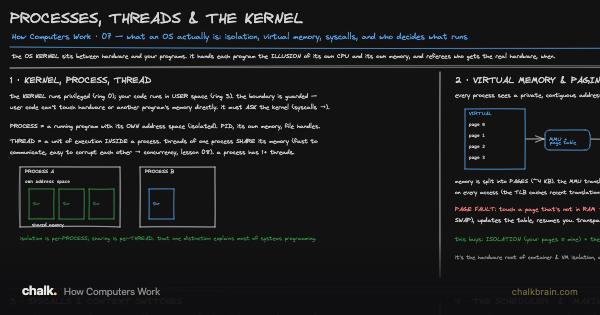
Processes Threads and the Kernel
Processes Threads and the Kernel · Open board

The kernel in the middle, handing every program a private-looking stretch of memory. This lesson opens the book the kernel keeps for each program, and asks what happens when the real memory behind it runs short.

Before you start. RAM is fast and small, the disk is huge and far slower, and a program runs well only when what it needs sits in the fast part (The Memory Hierarchy (cache, locality, the memory wall)). The address a program uses is not where its data really is: the kernel, the one program with full control of the hardware, translates every address on the way (Processes, Threads & the Kernel). And the kernel moves memory around in fixed-size pieces called pages, the same pieces it uses to cache files (The drawer that says it saved).

Continue reading with a plan

The first three lessons of every track are free. This lesson is included with a plan, which unlocks every lesson, board, video, lab and paper for one price.

View plans →Already a member? Sign in

Lab

The program needs twelve pages at once. What happens when it gets eleven frames?

Drag Frames of real memory from 24 down to 11, then back to 12, and watch Time spent working.

Open The working set →

Three long jobs are running when you press a key. How long until the keypress gets the CPU?

Click Take turns, drag How long one turn lasts from 100 ms down to 1 ms, and watch The keypress waits.

Open The time slice →

Related paper

Review How Computers Work →

Saved in this browser, and to your account when you sign in.