Index

Module 04 · How Computers WorkInside the operating system

Whose turn, and who decides
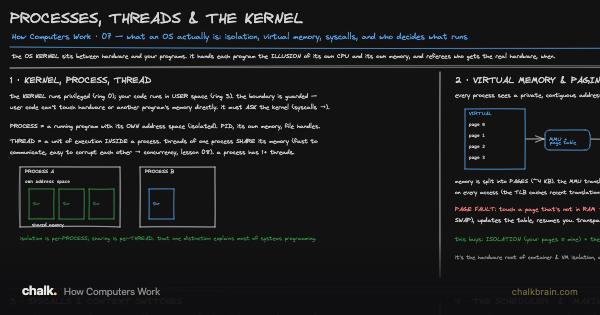
Processes Threads and the Kernel
Processes Threads and the Kernel · Open board

The kernel handing out turns on a few cores to many programs. This lesson asks the question the drawing takes for granted: when several programs are waiting, which one goes next?

Before you start. The CPU is the chip that runs a program’s instructions; a core is one of several copies of that machinery inside it, each running one program at a time. The kernel is the one program with full access to the hardware, and its scheduler gives each running program a short turn on a core, then takes it back and gives the next one a turn (Processes, Threads & the Kernel). Every swap from one program to another costs a little time, because the core has to save one program’s place and load the next one’s.

Continue reading with a plan

The first three lessons of every track are free. This lesson is included with a plan, which unlocks every lesson, board, video, lab and paper for one price.

View plans →Already a member? Sign in

Lab

The program needs twelve pages at once. What happens when it gets eleven frames?

Drag Frames of real memory from 24 down to 11, then back to 12, and watch Time spent working.

Open The working set →

Three long jobs are running when you press a key. How long until the keypress gets the CPU?

Click Take turns, drag How long one turn lasts from 100 ms down to 1 ms, and watch The keypress waits.

Open The time slice →

Related paper

Review How Computers Work →

Saved in this browser, and to your account when you sign in.